Resync Attendance
Last Updated: October 4, 2025 Document Version: 1.0 Prepared for: Emgage HRMS Implementation Team
The Resync Attendance feature allows administrators to fetch missing attendance data from biometric devices and other attendance tracking systems when data was not automatically recorded.
Overview
When biometric devices or other attendance systems fail to record daily attendance data, the resync feature recovers this missing information by directly fetching data from the connected devices.
Process Flow:
- Date Selection - Choose date range for missing attendance (maximum 7 days)
- Employee Selection - Select specific employees or all employees
- Device Sync - Click Resync button to fetch data from devices
- Data Update - System automatically updates attendance records
Interface
The resync interface displays employee lists with selection options for targeted attendance recovery.
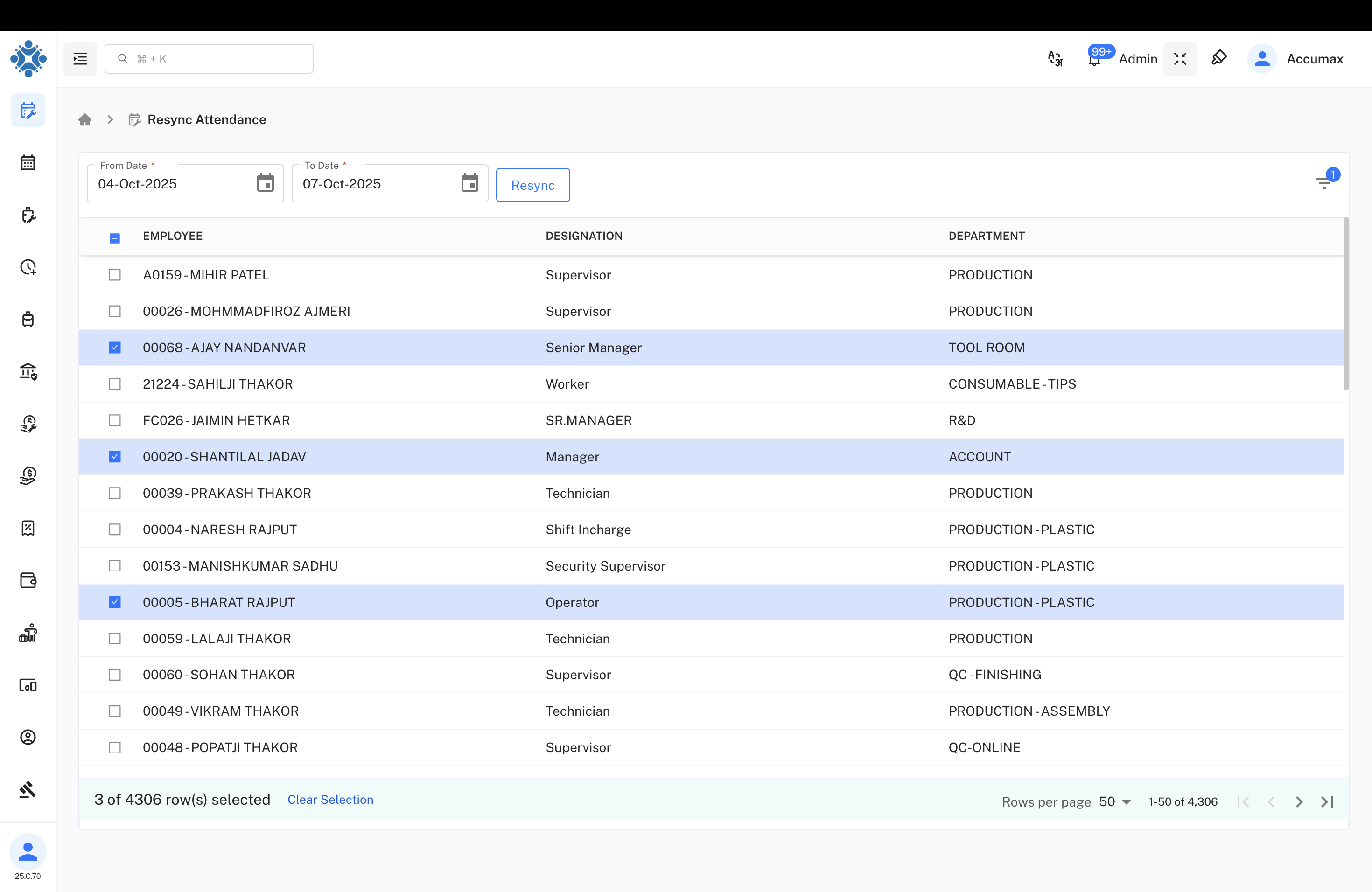
Key Components:
| Field | Description | Required |
|---|---|---|
| From Date | Start date for attendance sync | Yes |
| To Date | End date for attendance sync | Yes |
| Employee List | Employees available for attendance sync | Yes |
| Resync Button | Executes data fetch from connected devices | Yes |
Important Note: Maximum 7 days can be resynced in one operation.
How to Use
Step-by-Step Process:
- Set Date Range - Select From Date and To Date for the period with missing attendance (maximum 7 days)
- Choose Employees - Use checkboxes to select specific employees or select all
- Click Resync - Press the Resync button to start data fetch
- System Processing - Wait for system to retrieve and update attendance data
Employee Selection Options:
- Individual employee selection using checkboxes
- Bulk selection with "Select All" option
- Shows selection count (e.g., "3 of 4306 row(s) selected")
- Clear Selection to reset all choices
When to Use
Common Scenarios:
- Device Malfunction - When biometric devices temporarily failed to record
- Network Issues - After connectivity problems between devices and server
- Power Outages - Recovery after power interruptions affected devices
- Manual Verification - When attendance records appear incomplete
- Daily Maintenance - Regular sync to ensure data accuracy
Supported Devices
Device Types:
- Biometric Machines - Fingerprint and facial recognition devices
- RFID Card Readers - Employee card-based attendance systems
- Mobile Apps - Employee mobile attendance applications
- Manual Entry Systems - Supervisor-entered attendance data
Employee Information
The system shows comprehensive employee details for easy identification during resync operations:
Employee List includes:
- Employee ID - Unique identifier (e.g., A0159, 00026, FC026)
- Employee Name - Full name for identification
- Designation - Job role (Supervisor, Manager, Technician, etc.)
- Department - Work department (PRODUCTION, TOOL ROOM, R&D, etc.)
Pagination Features:
- Navigation controls for browsing employee lists
- Search functionality for quick employee location