Monthly Attendance
Last Updated: Oct 06,2025. Document Version: 1.0 Prepared for: Emgage HRMS Implementation Team
Monthly Attendance Management
** Comprehensive Attendance Overview** The Monthly Attendance feature provides a complete calendar view of company-wide attendance tracking. This system enables administrators to monitor employee attendance patterns, analyze trends, and access detailed attendance information for individual employees across entire months.
Navigation and Access
Access Path: Dashboard → Attendance → Monthly Attendance
Required Permissions:
- Attendance management access
- Employee data viewing rights
- Policy configuration access (for viewing policies)
Overview
Monthly Attendance Benefits
The Monthly Attendance system offers comprehensive attendance monitoring capabilities, allowing administrators to:
- Calendar View: Visual representation of attendance data across entire months
- Company-Wide Monitoring: Track attendance for all employees in a single interface
- Individual Analysis: Detailed employee-specific attendance information
- Attendance Categorization: Color-coded status indicators for different attendance types
- Policy Integration: View applicable attendance policies for each employee
- Detailed Reporting: Access comprehensive punch-in/out details and working hours
Monthly Attendance Dashboard
Calendar Interface
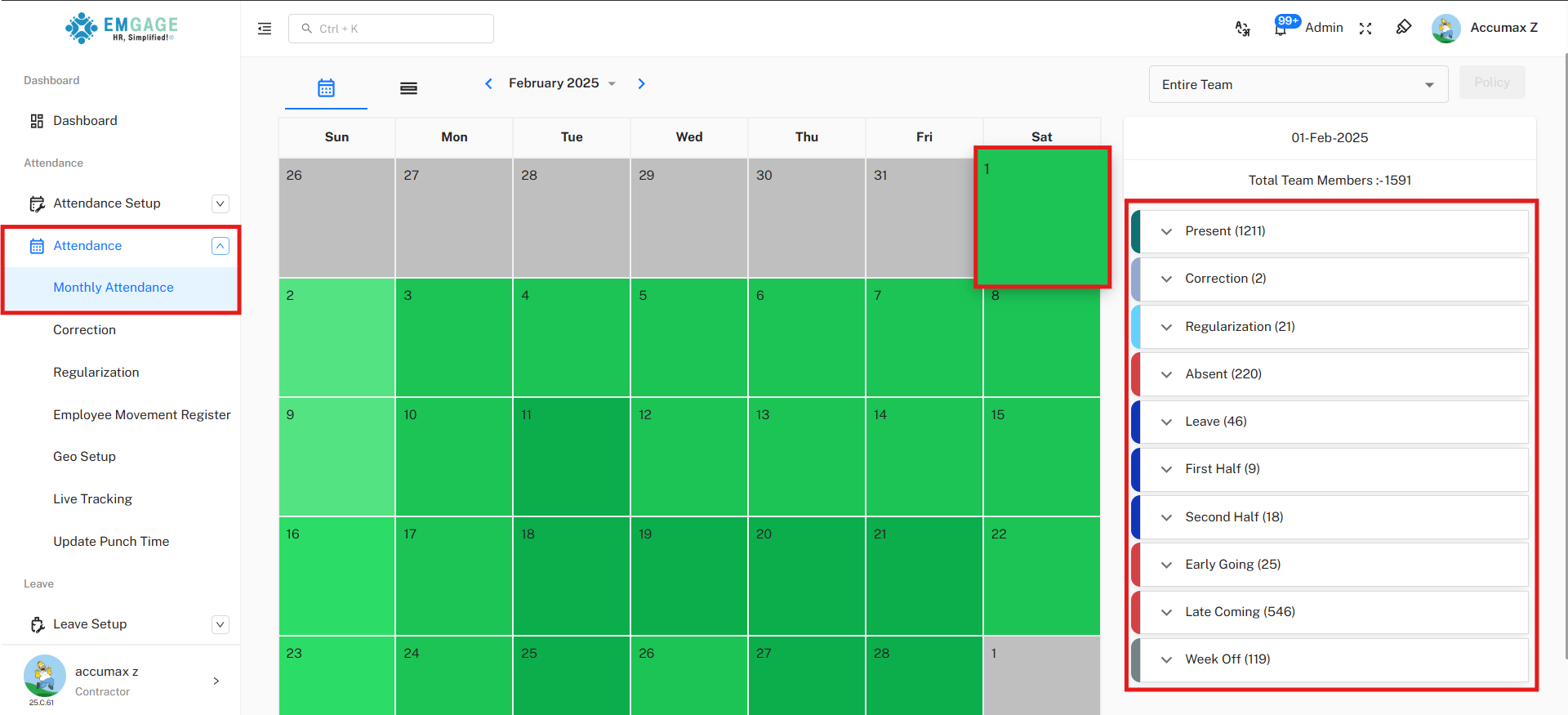
The main dashboard displays a month-by-month calendar view with the following features:
Navigation Controls:
- Month Selection: Navigate between different months using arrow controls (e.g., March 2025, February 2025)
- View Toggle: Switch between calendar and list views
- Team Filter: Select "Entire Team" or filter by specific departments/groups
- Employee Search: Search for specific employees using the dropdown selector
Attendance Status Indicators
Color-Coded System:
- 🟢 Green: Present - Employee attended work
- ** Red**: Absent - Employee was absent
- ** Blue**: Leave - Employee on approved leave
- 🟡 Yellow: Late Coming - Employee arrived late
- 🟣 Purple: Early Going - Employee left early
- ** Gray**: Week Off - Scheduled non-working day
- 🟠 Orange: Regularization - Attendance requires regularization
- etc.
Individual Employee Details
Employee Selection and Overview
Access Method:
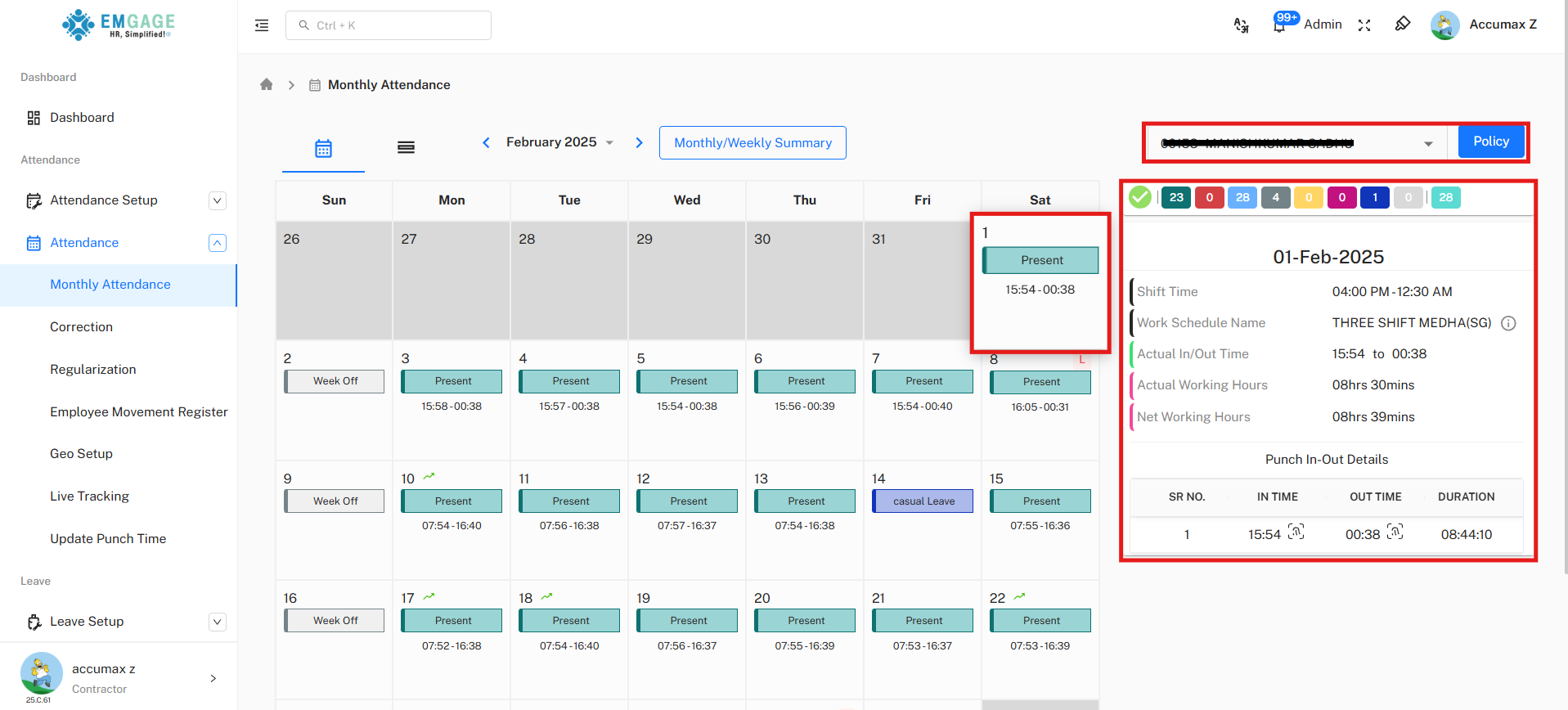
- Select Employee: Use the dropdown to search and select specific employee
- Date Navigation: Click on any date to view specific day details
- Policy Access: Click "Policy" button to view applicable attendance policies
Daily Attendance Details
When selecting a specific date (e.g., 26-Feb-2025), the system displays:
Basic Information:
- Shift Time: Work schedule timing (e.g., 12:00 AM - 12:30 AM)
- Work Schedule Name: Assigned shift name (e.g., THREE SHIFT MEDHA(SG))
- Attendance Status: Present/Absent/Leave status indicator
Time Details:
- Actual In/Out Time: Real punch-in and punch-out times (e.g., 15:53 to 00:30)
- Actual Working Hours: Total time spent at work (e.g., 08hrs 30mins)
- Net Working Hours: Calculated working time after breaks (e.g., 08hrs 31mins)
⏰ Time Tracking Features
- Multiple Punches: Support for multiple in/out entries per day
- Duration Calculation: Automatic calculation of work duration
- Break Management: Tracking of break times and intervals
- Overtime Detection: Identification of overtime hours worked
Attendance Policy Integration
Policy Access and Details
Policy Information Display:
Policy Configuration:
- Policy Name: Attendance Policy For staff
- Attendance Capture Method: Multiple methods supported ( Office, Mobile)
- Attendance Calculation Method: Total Working Hours based
- Multi Punch Allow: Disabled for this policy
Policy Rules and Limits
Correction Settings:
- Attendance Correction Limits: Enabled
- Correction requests can be raised till 7 days after the date to be corrected
- Maximum 5 correction requests allowed in a month
- Attendance Regularization Limits: Disabled
Allowed Regularizations:
- Work From Home: Allowed
- On Tour: Allowed
- Training: Allowed
- Late Coming Request: 02hrs 00mins hours allowed
- Early Going Request: 02hrs 00mins hours allowed
- Official Work: Allowed
- Time Off: Allowed
Grace Time and Penalties
Grace Time Settings:
- Grace Time for Fixed Shift: Full day: 03hrs 10mins Hrs
- Late Coming and Early Going: Enabled for "Fixed Work Schedule"
- Late coming grace: 0 minutes after shift start time
- Early going grace: 30 minutes before shift end time
- Allow late coming by 120 minutes in a month
- Allow early going by 0 minutes in a month
- Consider half day if first punch is late by 03hrs 31mins hours from shift start time
- Remove other penalties when half day penalty is applied
Penalty Structure:
- Apply Penalty: Enabled
- Group late coming and early going events for penalty calculation
- Deduction Event Type: After every events
- Deduct From: Salary per minute 100% of gross
- Waive penalty if working hours are completed (full day): Disabled
- Waive penalty if working hours are completed (half day): Enabled
** Monthly Attendance Management Tips**
Effective Usage Guidelines:
- Regular Monitoring: Review attendance patterns weekly to identify trends
- Policy Compliance: Ensure employees understand applicable attendance policies
- Timely Corrections: Process attendance corrections within the 7-day limit
- Documentation: Maintain records of regularization approvals and policy exceptions
- Team Communication: Use summary data for team attendance discussions
- Policy Updates: Regularly review and update attendance policies as needed