Employee Joining Form Overview
Last Updated: September 28, 2025 Document Version: 1.0 Prepared for: Emgage HRMS Implementation Team
Employee Joining Form System
The Employee Joining Form is a comprehensive onboarding solution that streamlines the process of bringing new candidates into your organization. This system offers multiple flexible methods for candidate registration and management.
System Overview
The Joining Form dashboard serves as the central command center for all candidate onboarding activities. From this unified interface, administrators can manage the entire candidate lifecycle from initial application to employee conversion.
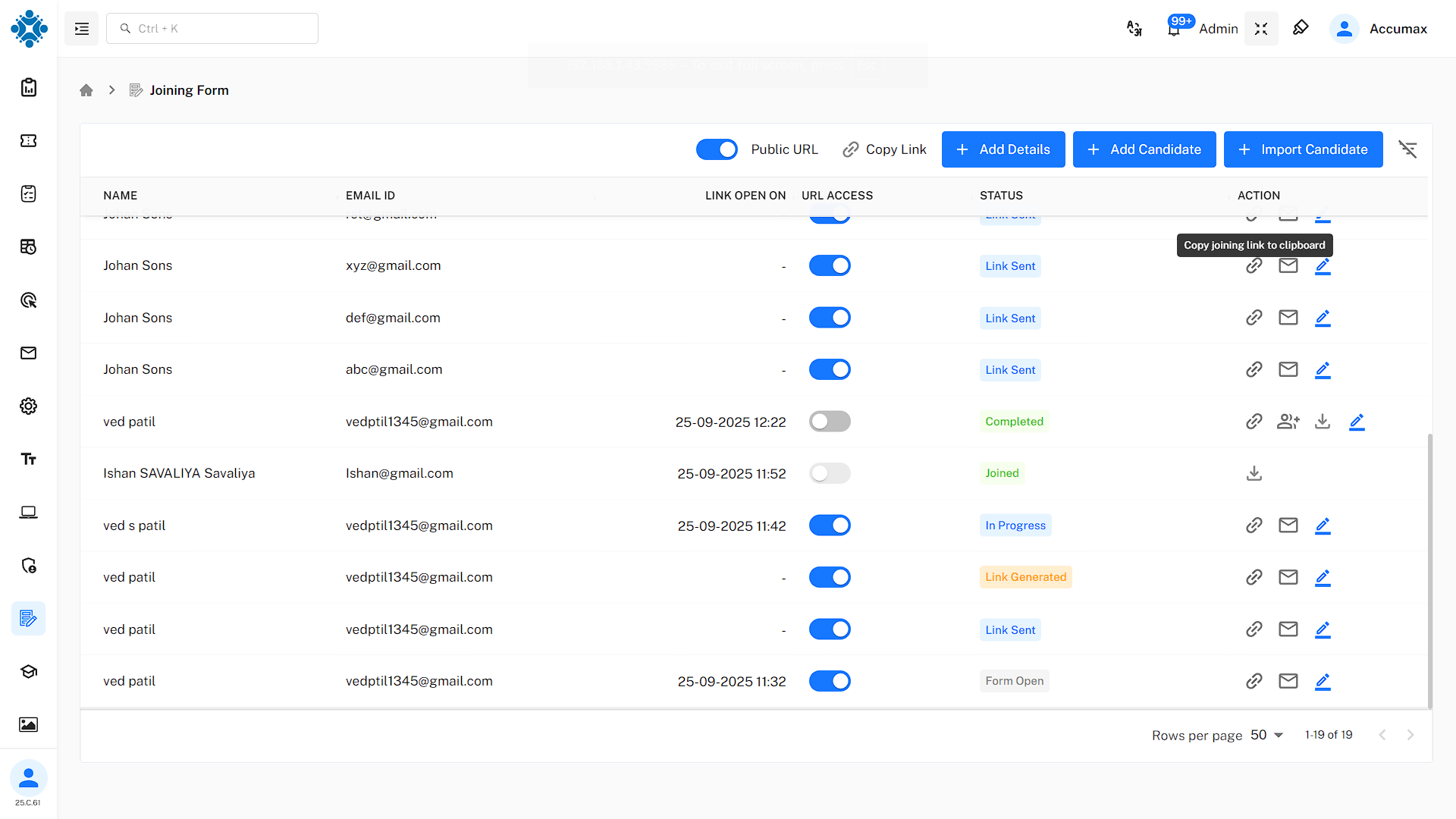
The dashboard provides real-time visibility into:
- Active Candidates: Those currently in the onboarding process
- Completed Applications: Candidates ready for conversion
- Pending Reviews: Applications awaiting administrator action
- Status Analytics: Overview of onboarding pipeline health
Available Onboarding Methods
This system supports four distinct methods for candidate onboarding, each designed for different use cases:
1. Public URL Method - Perfect for open job postings and general recruitment campaigns where you want to provide a single, shareable link for all potential applicants.
2. Individual Candidate Addition - Ideal for targeted recruitment where you're adding specific candidates one by one, with options for admin-filled forms or candidate self-service.
3. Bulk Excel Import - Efficient for mass onboarding scenarios where you have candidate data in spreadsheet format and need to process multiple candidates simultaneously.
4. Direct Admin Entry - Allows administrators to directly input candidate information for immediate processing without external candidate involvement.
Documentation Structure
This documentation is organized into detailed guides for each aspect of the system:
- Dashboard Management - Complete dashboard functionality and navigation
- Public URL Setup - Configuring and managing public application links
- Individual Candidates - Adding candidates one by one
- Bulk Import Process - Mass candidate import via Excel
- Candidate Experience - What candidates see and do
- Admin Conversion Process - Converting candidates to employees
- Post-Onboarding Setup - Final configuration and employee setup
Key Features
- Role-based permissions for different user types
- Secure candidate data handling and privacy protection
- Audit trails for all onboarding activities
- Multiple onboarding pathways to suit different scenarios
- Customizable forms and data collection requirements
- Adaptable workflow configurations
- Real-time dashboard analytics and status tracking
- Comprehensive reporting on onboarding metrics
- Performance insights and bottleneck identification
Integration Capabilities
- Seamless integration with existing HRMS modules
- Employee profile automatic creation upon conversion
- Salary and benefits system connectivity
Next Steps: Choose a specific area to explore in detail from the navigation menu, or continue with the Dashboard Management guide to understand the central control interface.