Employee Hierarchy Chart Configuration
Overview
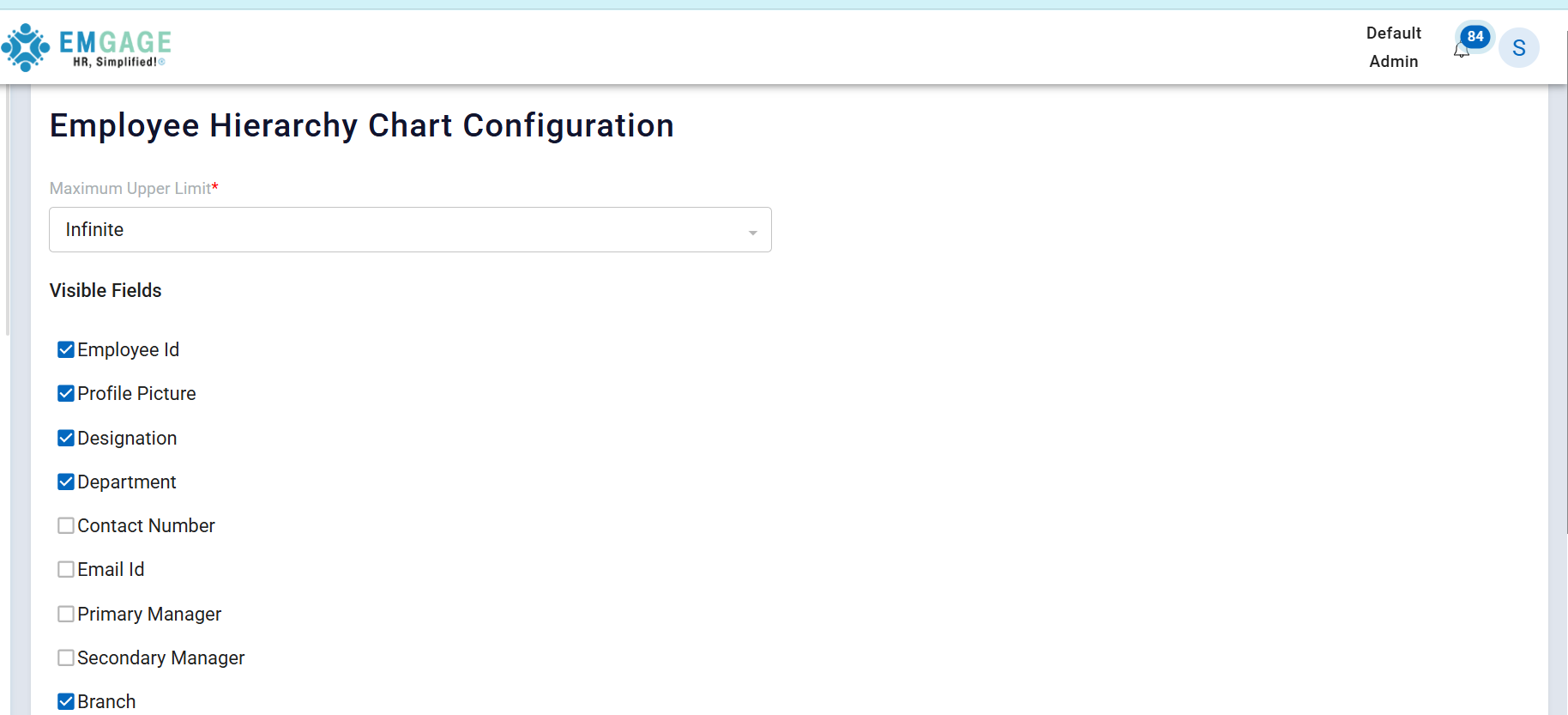
The Employee Hierarchy Chart Configuration page allows administrators to configure which employee information is visible in the Employee Hierarchy (Organization) Chart.
This configuration controls the data fields displayed on each employee card within the hierarchy chart.
Purpose
This page is used to:
- Define the depth of the hierarchy displayed
- Select employee attributes to be shown on the chart
- Customize the chart view based on organizational needs
- Maintain clarity and avoid information overload in the hierarchy chart
Screenshot Reference
Page Sections
The configuration page consists of the following main sections:
- Maximum Upper Limit
- Visible Fields
- Action Buttons
1. Maximum Upper Limit
Field: Maximum Upper Limit (Required)
- Determines how many levels upward in the hierarchy can be displayed
- Default value: Infinite
- Ensures the hierarchy chart can expand fully unless restricted
Example Values:
Infinite– Displays the complete hierarchy- Numeric values (if configured) – Limits visible levels
2. Visible Fields
The Visible Fields section allows administrators to select which employee attributes appear on each node in the hierarchy chart.
Only the checked fields will be displayed.
Available Configuration Fields
| Field Name | Description |
|---|---|
| Employee Id | Displays unique employee identifier |
| Profile Picture | Shows employee profile image |
| Designation | Displays employee job title |
| Department | Displays employee department |
| Contact Number | Shows employee phone number |
| Email Id | Displays official email address |
| Primary Manager | Shows primary reporting manager |
| Secondary Manager | Shows secondary reporting manager |
| Branch | Displays employee branch |
| State | Displays employee state |
| Birth Date | Displays employee date of birth |
| Direct Reporties | Shows number of direct subordinates |
| Total Reporties | Shows total subordinates under hierarchy |
3. Action Buttons
| Button | Function |
|---|---|
| Submit | Saves the selected configuration |
| Reset | Resets fields to default selection |
Configuration Behavior
- Changes apply to the Employee Hierarchy Chart view
- Only selected fields are rendered on employee cards
- Configuration affects all users who view the hierarchy chart
- No employee data is modified — only visibility is controlled
Access Control
| Role | Permission |
|---|---|
| Admin | Configure & Update |
| HR | View / Configure (if permitted) |
| Employee | No access |
Use Case Example
Scenario:
HR wants to show only basic reporting information.
Configuration:
- Enable: Employee Id, Designation, Department
- Disable: Contact Number, Email Id, Birth Date
Result:
Hierarchy chart displays a clean structure focused on reporting relationships.
Business Benefits
- Customizable hierarchy visualization
- Improved readability of org chart
- Better data privacy control
- Flexible configuration without code changes
Conclusion
The Employee Hierarchy Chart Configuration page provides administrators with complete control over the information displayed in the employee hierarchy chart, ensuring clarity, relevance, and organizational consistency.
Employee Hierarchy Chart
Overview
The Employee Hierarchy Chart visually represents the organizational reporting structure of employees in a hierarchical (tree) format.
The chart displays employee information based on the configuration defined in the Employee Hierarchy Chart Configuration page.
Purpose
The Employee Hierarchy Chart helps users to:
- Understand reporting relationships
- Identify managers and subordinates
- View organizational structure at different levels
- Quickly analyze team distribution
Screenshot Reference
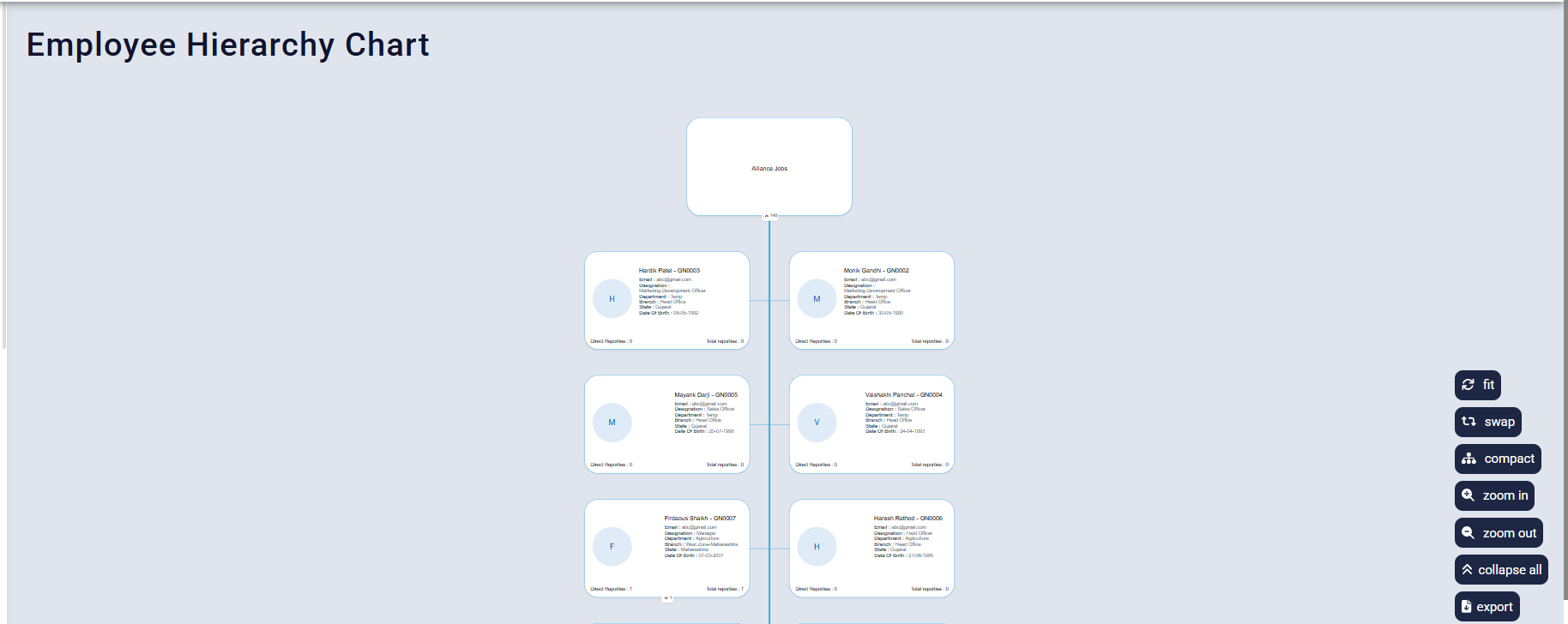
Chart Structure
1. Top-Level Node
- Displays the Organization / Company name
- Acts as the root of the hierarchy
- All employee reporting flows from this node
2. Employee Nodes
Each employee is displayed as a card (node) connected by hierarchy lines.
The information shown on each employee card is fully controlled by the Employee Hierarchy Chart Configuration.
Information Displayed on Employee Cards
Based on the configuration screenshot, the following fields are shown:
Enabled Fields (Visible)
| Field | Description |
|---|---|
| Employee Id | Unique employee identifier |
| Profile Picture | Employee avatar or initials |
| Designation | Employee job title |
| Department | Employee department |
| Branch | Employee work location |
| State | Employee state |
| Direct Reporties | Number of direct subordinates |
| Total Reporties | Total subordinates under hierarchy |
Only fields enabled in configuration are visible on the chart.
Reporting Indicators
Each employee card includes reporting statistics at the bottom:
| Indicator | Meaning |
|---|---|
| Direct Reporties | Employees reporting directly |
| Total Reporties | Employees reporting directly or indirectly |
These values help managers quickly assess team size.
Chart Controls & Actions
The hierarchy chart provides interactive controls on the right side:
| Control | Function |
|---|---|
| Fit | Adjusts chart to fit screen |
| Swap | Changes chart orientation |
| Compact | Compresses chart layout |
| Zoom In | Enlarges chart view |
| Zoom Out | Reduces chart view |
| Collapse All | Collapses all nodes |
| Export | Exports chart data/view |
Hierarchy Depth Control
- The depth of the hierarchy is controlled by Maximum Upper Limit
- When set to Infinite, the complete reporting structure is displayed
- Limits (if applied) restrict visible levels
Data Source
- Chart data is generated from:
- Employee reporting relationships
- Manager assignments
- Organization onboarding setup
- No manual editing is allowed on the chart itself
Access Control
| Role | Access |
|---|---|
| Admin | View |
| HR | View |
| Manager | View |
| Employee | View (as permitted) |
This is a read-only visualization module.
Configuration Dependency
The Employee Hierarchy Chart is directly dependent on:
- Employee Hierarchy Chart Configuration
- Employee master data
- Reporting manager mapping
Any configuration change reflects immediately on the chart.
Business Benefits
- Clear visualization of organization structure
- Faster understanding of reporting lines
- Improved managerial oversight
- Reduced dependency on manual org charts
Limitations
- No edit, add, or delete operations on chart
- Changes must be done via configuration or employee master data
- Used only for visualization
Conclusion
The Employee Hierarchy Chart provides a dynamic, configurable, and visually intuitive representation of employee reporting structures, ensuring clarity, consistency, and organizational transparency across the company.