Sick Leave
- Sick Leave is provided to employees when they are unwell or medically unfit to work.
- It allows employees to take time off to rest and recover.
- In some companies, a medical certificate may be required if the sick leave is for more than a certain number of days.
To make a new leave code policy, click on the + Add button on the Leave Code Policy List page.
Leave Code Policy Page
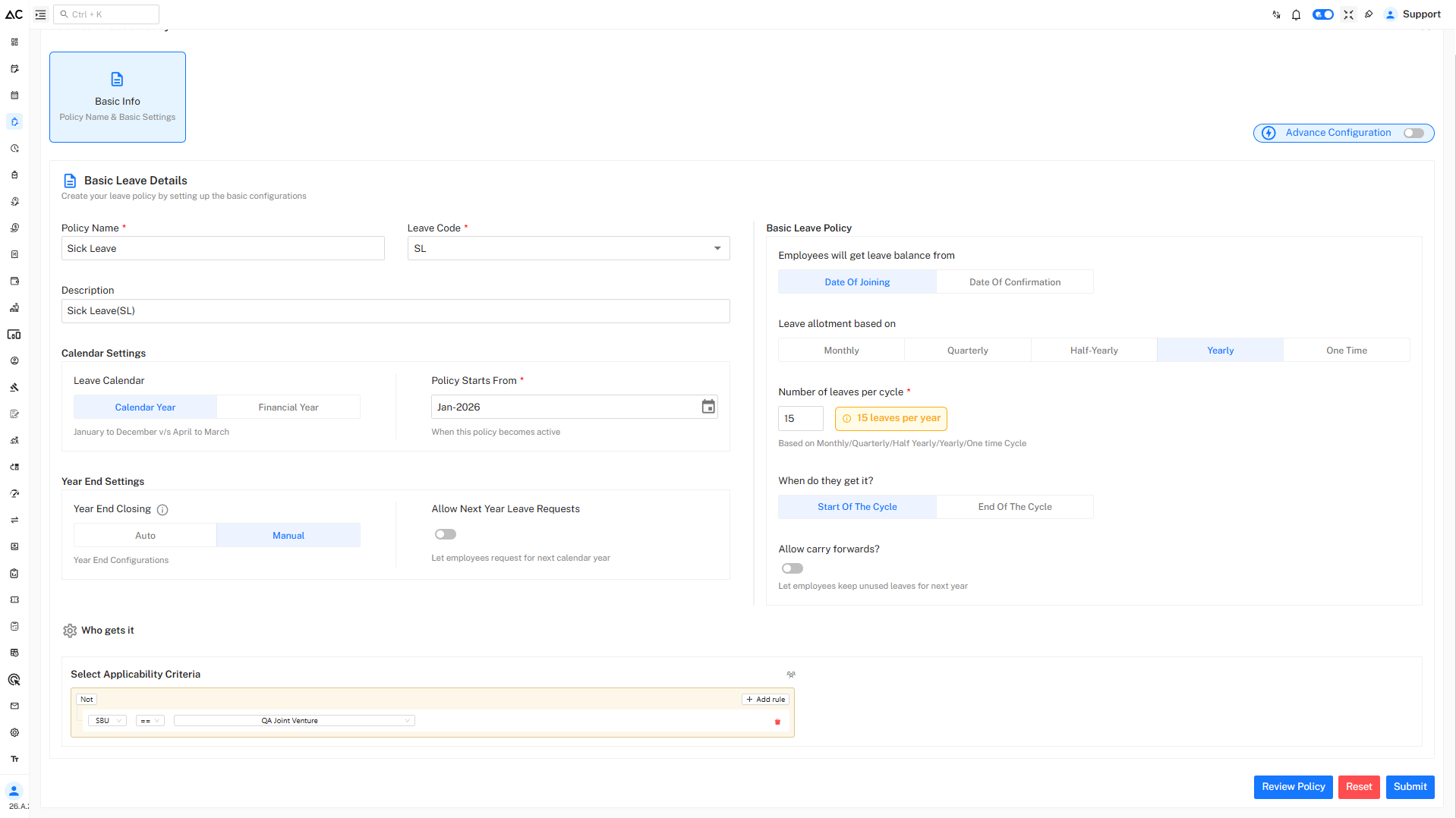
After clicking + Add, you will see a page like this:
Fill the Details
Enter the following information:
- Policy Name: Sick Leave
- Leave Code: SL
- Description: Sick Leave
Calendar Setting
Leave Calendar: Select the leave calendar type:
-
Calendar Year – January to December
- The leave year starts on 1st January and ends on 31st December.
- All leave allotments, usage, carry forward, and year-end processing are calculated within this period.
- This option is commonly used by organizations that follow the standard calendar year for HR and reporting.
-
Financial Year – April to March
- The leave year starts on 1st April and ends on 31st March of the next year.
- Leave balances and carry forward are managed within this financial cycle.
- This option is widely used by organizations that align leave policies with the financial year.
Policy Start From:
- Defines the month and year from which the leave policy becomes effective.
Year End Setting
Choose how leave balance is handled at year end:
-
Auto : Balance is auto-updated on the first date of the new year.
-
Manual : Balance is updated after freezing the last month's attendance.
Allow Next Year Leave Requests:
-
Disabled : Employees can apply only for the current year’s leave.
-
Enabled : Employees can apply for leave for the next year.
Basic Leave Policy
Leave Balance Entitlement
Choose when employees will receive their leave balance:
-
Date of Joining
Leave balance is credited starting from the employee’s joining date. Employees can start earning and using leave from their first day of work. -
Date of Confirmation
Leave balance is credited only after the employee is officially confirmed. No leave balance is given during the probation period.
Leave Allotment Based On
Select how leaves are credited:
-
Monthly : Leave is credited every month.Example: 1 leave on the first day of each month.
-
Quarterly : Leave is credited every three months.Example: 3 leaves in January, April, July, and October.
-
Half-Yearly : Leave is credited twice a year.Example: 6 leaves in January and 6 leaves in July.
-
Yearly : Leave is credited once a year.Example: 12 leaves on January 1.
-
One Time : Leave is credited only once.Example: 3 condolence leaves given at the start of the year.
Number of Leaves per Cycle
This field defines how many leaves are given in each selected cycle.
Example
- 1 leave per cycle
- Result: 12 leaves per year
The calculation automatically changes based on the selected cycle (Monthly, Quarterly, Yearly, etc.).
When Do They Get It?
Choose when the leave balance is credited:
-
Start of the Cycle
Leave is credited at the beginning of the cycle. -
End of the Cycle
If you select End of the Cycle, it means employees get their leave after completing a certain period (like after a year or month), not at the start.The number of leave allotted will be based on?
This option only appears if End of the Cycle is selected.
-
Fixed
Employees get a set number of leaves, no matter their attendance. -
Attendance Based
Leaves depend on how regularly the employee attended during the cycle.
-
Carry Forward
-
Disabled Unused leaves will not be carried forward to the next year.
-
Enabled Unused leaves will be carried forward to the next year.
Who Gets This Leave
Under Who gets it, define the applicability criteria.
Steps
- Click on Add rule
- Select criteria such as SBU
- Apply Any in or Not conditions
This ensures the policy is applied only to eligible employees.
Show All Members
This option displays all policy members along with their ID and name.
It also allows searching and downloading the data in PDF, Excel, or CSV format.
Review and Submit
- Click on Review Policy to verify all entered details.
- Click Submit to create the Privilege Leave policy.
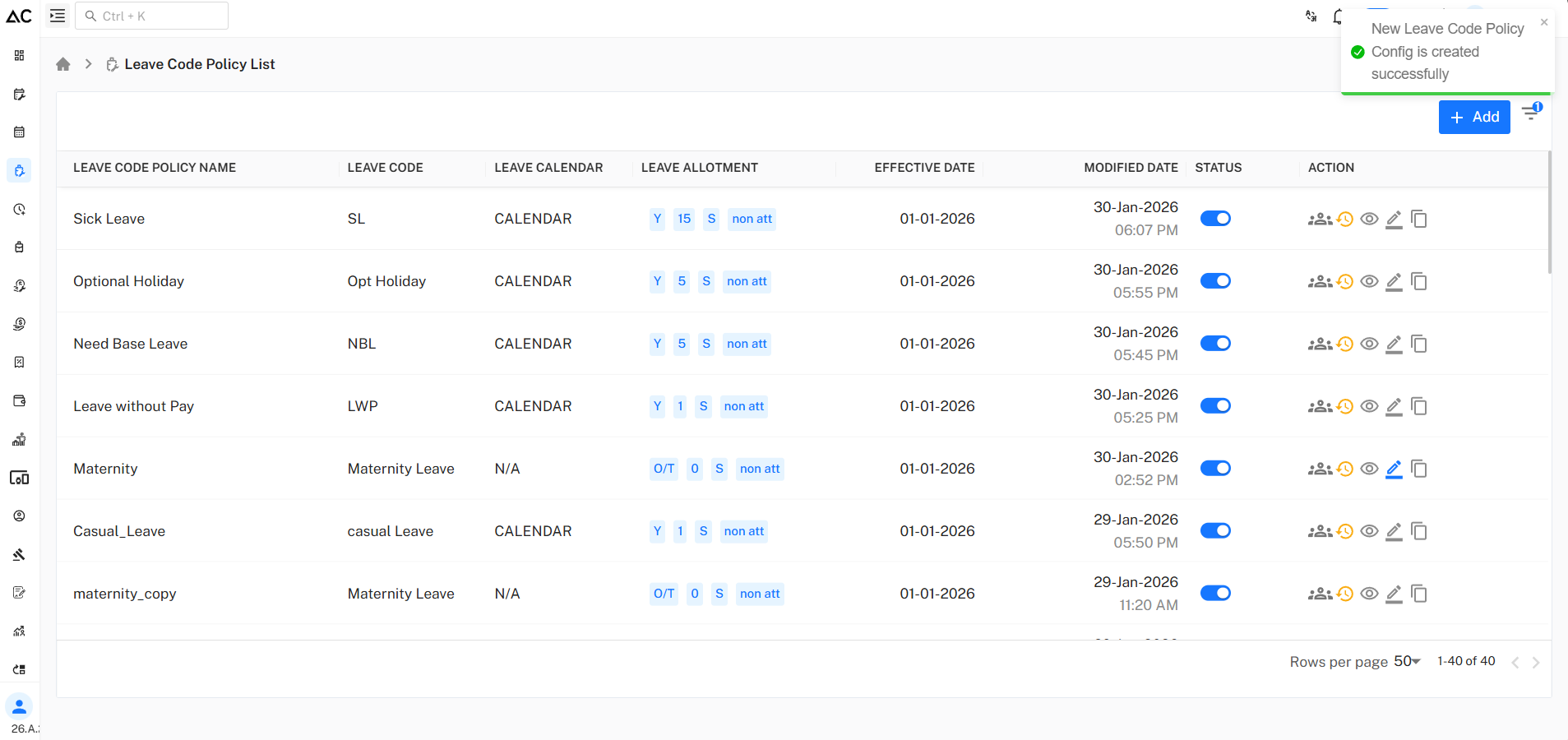
A success message confirms that the Sick Leave policy has been created successfully.
Summary
- Sick Leave (SL) is provided to employees to take time off when they are ill or need medical care.
- Granted annually or periodically as per company policy.
- Usually cannot be carried forward or encashed.
- May require medical proof for longer absences.
- Intended for short-term health-related leave.