Leave Clubbing
Last Updated: October 7, 2025
Document Version: 1.0
Prepared for: Emgage HRMS Implementation Team
The Leave Clubbing module allows administrators to define restrictions on combining two leave types together.
It ensures that specific leaves (e.g., Maternity Leave, Casual Leave) cannot be applied together in a single leave period, helping maintain compliance with HR and statutory policies.
This module supports configuration, validation, activation/deactivation, and filtering of leave clubbing rules across the organization.
System Overview
The Leave Clubbing system is designed around three key components:
- Leave Clubbing Table – Displays all configured clubbing restrictions
- Toolbar Actions – Options to add or filter clubbing rules
- Leave Clubbing Request Form – Used to define non-combinable leave pairs
This structure ensures controlled leave behavior and prevents policy violations.
Leave Clubbing Table
The Leave Clubbing Table provides a complete list of leave combinations that are not allowed to be clubbed together.

Table Columns
| Column | Description |
|---|---|
| Leave Code | The primary leave to which the restriction applies. |
| Not Clubbed With | The leave type that cannot be combined with the primary leave. |
| Status | Toggle to enable/disable the restriction rule. |
Each record represents one clubbing restriction pair.
Toolbar Actions
Located above the table, the Toolbar provides quick access to key controls.

Available Options:
- + Add – Opens the Leave Clubbing Request form
- Filter – Allows filtering clubbing records based on criteria
- Pagination Controls – Manage number of records displayed per page
These actions support quick configuration and management.
Leave Clubbing Request Form
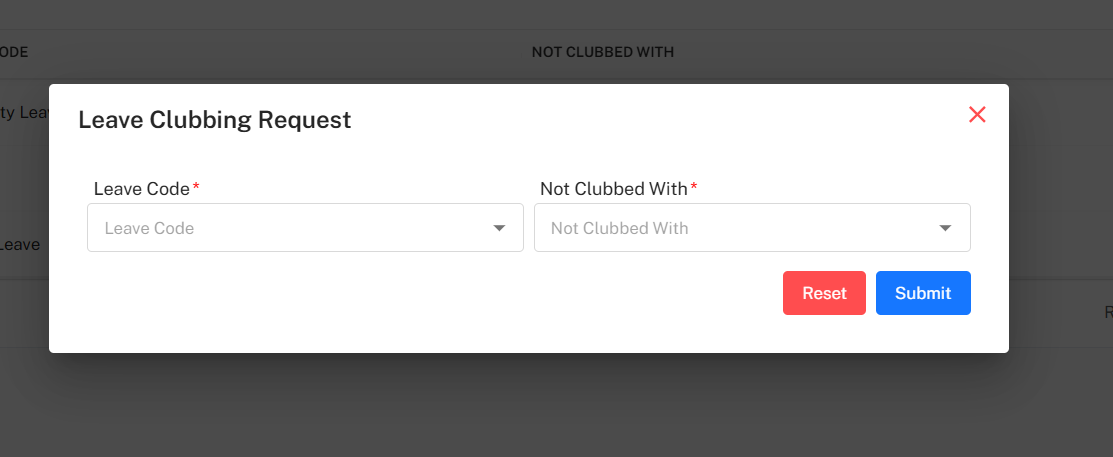
Administrators can configure a new restriction using the Leave Clubbing Request form.
Mandatory Fields
| Field | Description |
|---|---|
| Leave Code | Select the primary leave for which restriction is applied. |
| Not Clubbed With | Select the leave that cannot be combined with the selected Leave Code. |
Actions
- Reset – Clears the selected values
- Submit – Saves and activates the restriction rule
Once submitted, the system prevents employees from applying both leaves together.
Filter Leave Clubbing Rules
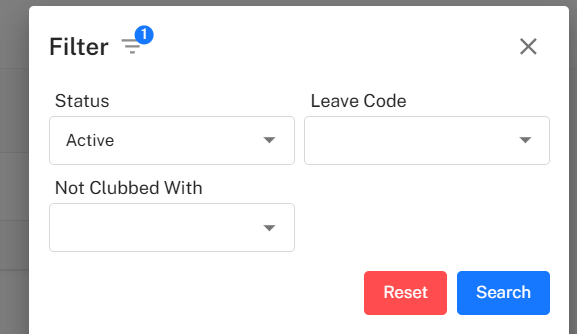
The Filter panel helps administrators quickly locate specific clubbing rules based on defined conditions.
Available Filters
| Filter Type | Description |
|---|---|
| Status | Filter records by Active or Inactive rules. |
| Leave Code | Search records based on selected leave code. |
| Not Clubbed With | Filter by the restricted paired leave type. |
Filter Actions
- Search – Applies the selected filter parameters
- Reset – Clears filters and reloads full list
Activating & Deactivating Clubbing Rules
- Each restriction includes a Status Toggle
- If set to Inactive, the clubbing restriction will not apply
- Reactivating the rule reinstates leave restriction behavior
This allows temporary rule suspension when required.
Implementation Guidelines
For HR Administrators:
- Define clubbing rules based on organizational policies
- Avoid conflicting combinations across leave types
- Review rules during policy updates
- Keep unused rules deactivated instead of deleting
- Test new rules before applying globally
For HR Teams:
- Validate rules against leave application behavior
- Inform employees about restricted combinations
- Review inactive rules periodically
- Maintain consistency across department-level policies
Common Issues and Solutions
| Issue | Possible Cause | Recommended Solution |
|---|---|---|
| Employees able to combine restricted leaves | Rule set to Inactive | Enable status toggle. |
| Duplicate restriction entry | Same leave pair already exists | Remove or update existing record. |
| Rule not applying to employees | Incorrect leave pair mapping | Verify selected Leave Code and Not Clubbed With values. |
Best Practices
- Apply clubbing restrictions only when required by policy
- Avoid over-restricting leave combinations
- Document every rule for audit traceability
- Review rules annually or during policy revisions
- Maintain alignment with compliance and labor regulations