Leave Carry Forward List
Last Updated: October 6, 2025 Document Version: 1.0 Prepared for: Emgage HRMS Implementation Team
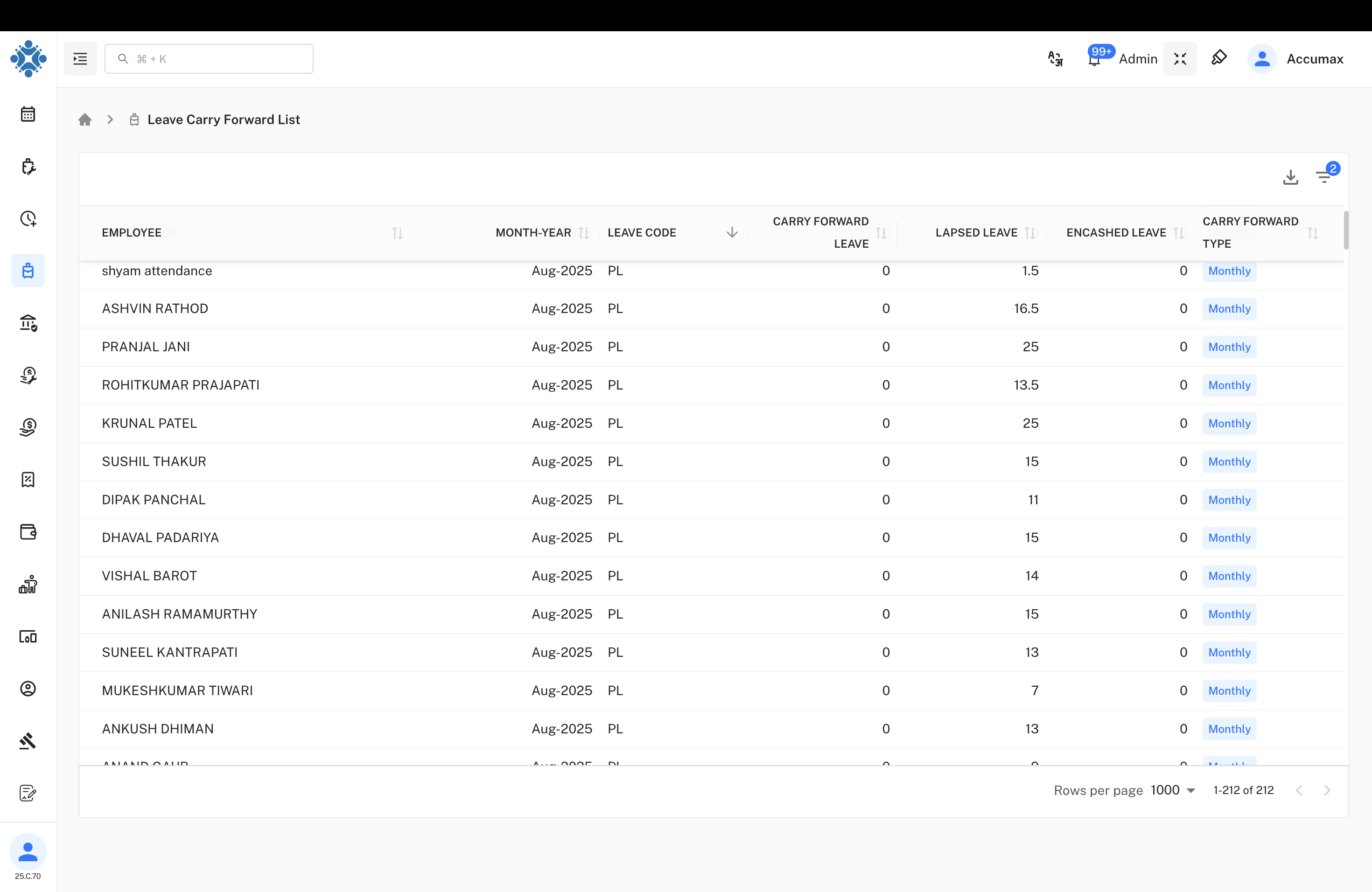
This page helps you track and analyze the leave status for employees, including carry forward, lapsed, and encashed balances for any selected period.
Main View
The table includes these columns:
- Employee: Name of the employee
- Month-Year: Leave cycle (e.g., Aug-2025)
- Leave Code: Type of leave (PL, SL, etc.)
- Carry Forward Leave: Days carried to new period
- Lapsed Leave: Expired leave days
- Encashed Leave: Days paid out
- Carry Forward Type: Frequency (Monthly/Quarterly/Yearly/One Time)
Filter Panel & Drop-downs
Use the filter panel to refine list results. Each drop-down comes with specific choices:
1. Employee Status
- Active: Currently working employees.
- Inactive: Temporarily not working (on leave/suspended).
- FnF (Full & Final): Employees who have left the company.
2. Employee
- Dropdown list of names: Select a specific employee or leave blank for all.
3. Month/Year
- Date selector: Choose the leave period you want to inspect.
4. Leave Code
All the types of leave you can filter by:
- casual Leave (CL): Short personal leave, usually not carried forward.
- PL (Privilege Leave): Earned leave, often carried forward to new periods.
- NBL (Non-Banking Leave): Special category as per organization.
- Maternity Leave: Leave entitlement for childbirth.
- Paternity Leave: Leave for fathers at childbirth.
- Condolence Leave: Time off for bereavement.
- Opt Holiday: Optional public holiday chosen by employee.
- LWP (Leave Without Pay): Unpaid leave; not counted for carry forward.
- SL (Sick Leave): Used for medical needs.
- OL (Other Leave): Any other leave category.
- Compensatory off: Leave for working extra hours.
5. Carry Over Type
How the carry forward is calculated:
- Monthly: Updates every month.
- Quarterly: Every three months.
- Half Yearly: Twice a year.
- Yearly: Once a year.
- One Time: Single event basis.
Tip: Use multiple filter combinations for granular analysis. Example: Filter by 'Active' status, select 'PL' to see only Privilege Leave, and set 'Monthly' for current month calculation.