Need Based Leave (NBL)
- Need Based Leave (NBL) allows employees to take leave for genuine personal or urgent needs that are not covered under other leave types.
- This leave provides flexibility to handle unforeseen situations as per company policy.
Create Need Based Leave Policy
To create a new Need Based Leave (NBL) policy, click on the + Add button on the Leave Code Policy List page.
Leave Code Policy Creation Page
After clicking + Add, the Basic Leave Details page will open as shown below:
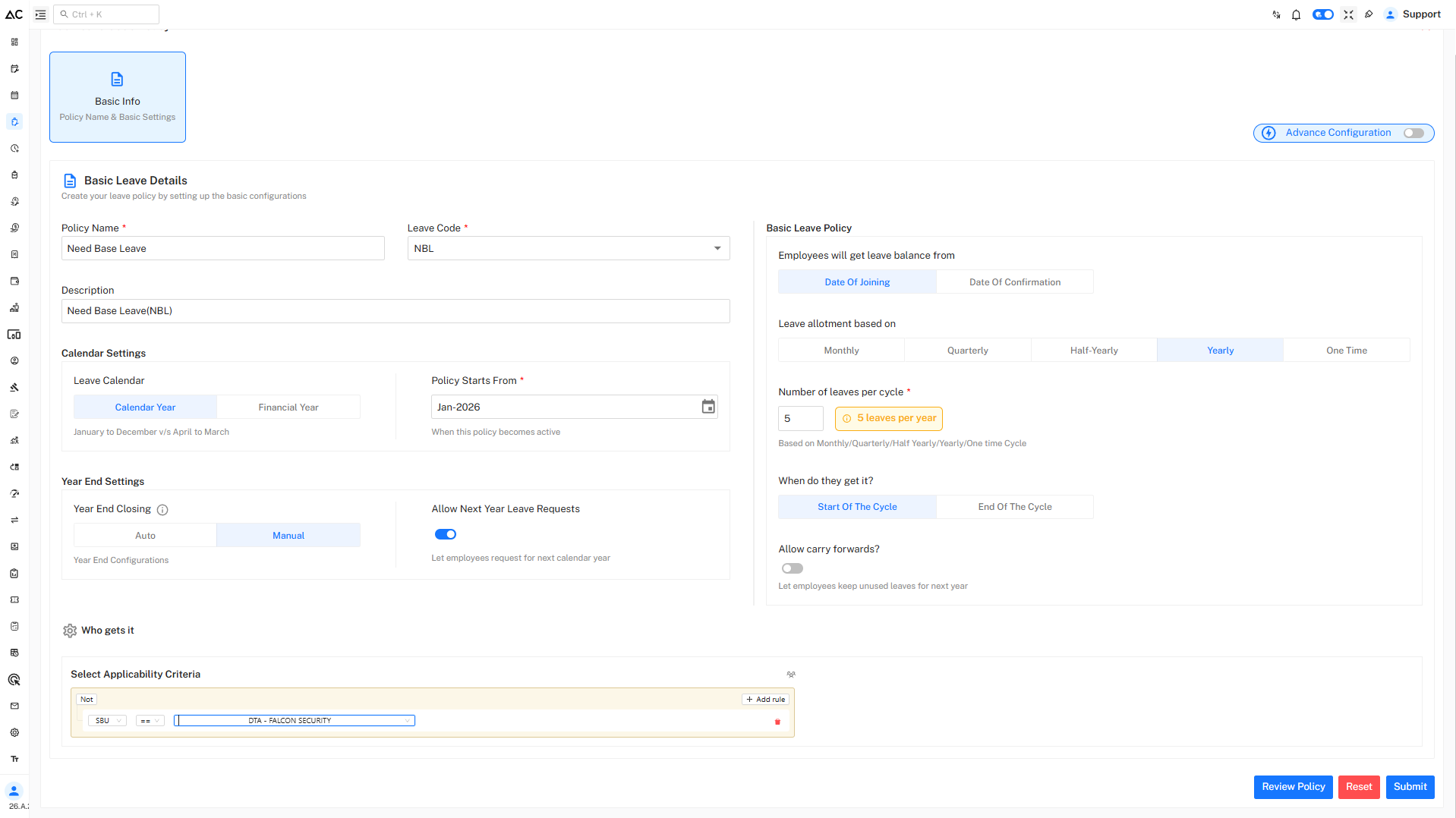
Basic Leave Details
Configure the following fields:
-
Policy Name : Enter the name of the Need Based Leave policy.
-
Leave Code : Select or enter a unique code for Need Based Leave.
-
Description : Provide a brief description of the Need Based Leave type.
Calendar Settings
Under Calendar Settings, configure the following options:
-
Leave Calendar
Choose whether the leave policy follows:- Calendar Year (January to December)
- Financial Year (April to March)
-
Policy Starts From
Select the date from which the policy becomes active.
Basic Leave Policy Configuration
Leave Balance Eligibility
Define when employees become eligible for Need Based Leave :
- Date of Joining
- Date of Confirmation
Leave Allotment Based On
Select how Need Based Leave is allotted:
- One Time
- Yearly
- On Approval
Number of Leaves per Cycle
Specify the number of Need Based Leave days allowed per cycle.
Approval is generally required before availing this leave.
When Do They Get It?
Define when the Need Based Leave balance is credited:
- On Approval
Carry Forward
Enable or disable carry forward to decide whether unused Need Based Leave can be carried forward.
(Usually disabled as this is an exception-based leave.)
Year End Settings
Configure year-end behavior for the Need Based Leave policy:
-
Year End Closing
Choose between:- Auto
- Manual
-
Allow Next Year Leave Requests
Enable this option if employees are allowed to apply for Need Based Leave in advance.
Who Gets This Leave
Under Who gets it, define the applicability rules for Need Based Leave.
Steps:
- Click Add rule
- Select applicable criteria such as:
- SBU
- Department
- Unit
- Location
- Use Any in or Not conditions to include or exclude employee groups.
Review and Submit
- Click Review Policy to verify all configurations.
- Click Submit to save the Need Based Leave policy.
A confirmation message will appear after successful creation.
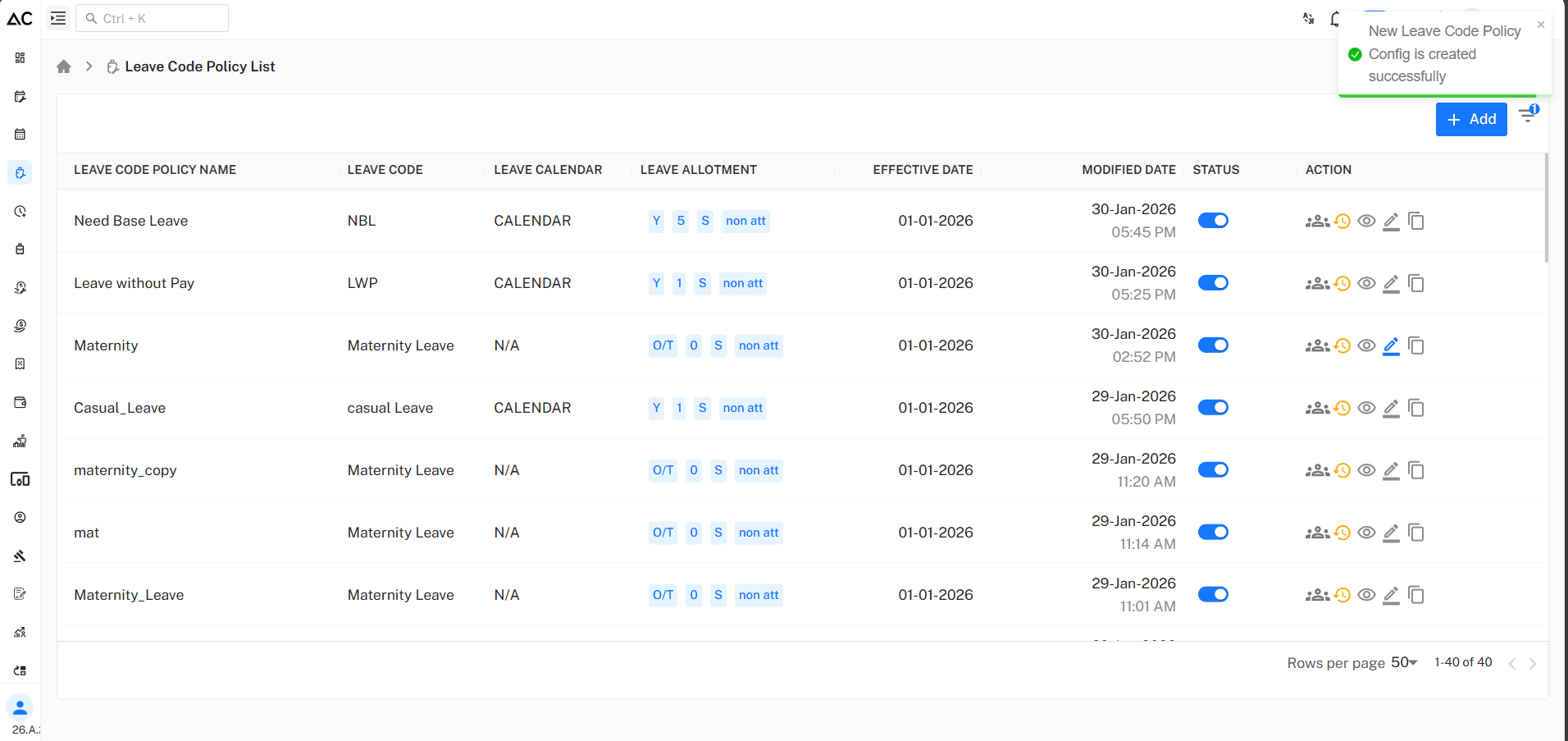
Policy Listing
Once created, the Need Based Leave policy will appear in the Leave Code Policy List, displaying:
- Leave code
- Allotment details
- Effective date
- Status
- Action options: View, Assign, Edit, Copy, History
Summary
- Need Based Leave is used for urgent or exceptional personal needs
- Subject to approval as per company policy
- Not a regular or accrued leave type
- Provides flexibility while maintaining policy control