Loan Disbursement Management
Last Updated: October 27,2025 Document Version: 1.0 **Prepared for:**Emgage HRMS Implementation Team
Streamlined Fund Disbursement The loan disbursement module provides a comprehensive system for processing approved loan requests, calculating EMI schedules, and managing fund distribution to employees with complete transparency and tracking.
Disbursement Process Overview
 Efficient Fund Management
The loan disbursement system offers structured control over fund release, enabling organizations to:
Efficient Fund Management
The loan disbursement system offers structured control over fund release, enabling organizations to:
- Process Approved Loans: Convert approved loan requests into active disbursements
- Generate EMI Schedules: Automatically calculate installment breakdowns
- Maintain Audit Trails: Track all disbursement activities with timestamps
- Ensure Policy Compliance: Verify disbursements against policy limits and criteria
- Provide Financial Transparency: Share clear repayment terms with employees
Loan Disbursement Interface
Individual Loan Disbursement
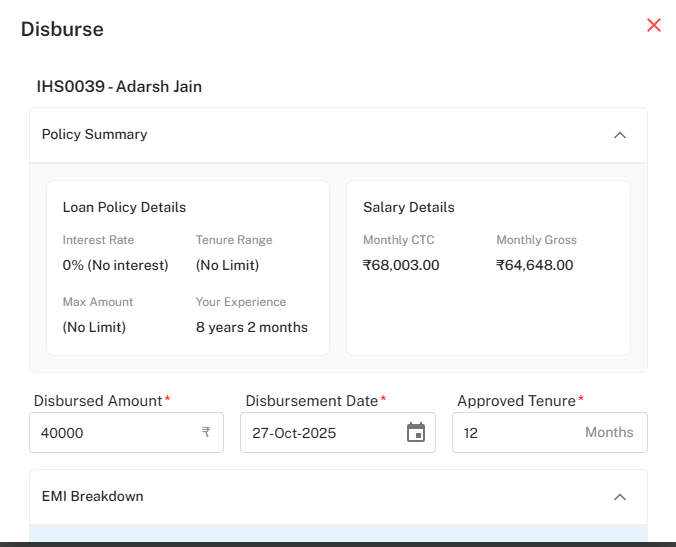
!Disbursement Form Interface
Comprehensive Disbursement Processing Step-by-Step Disbursement Workflow:
-
Employee and Policy Overview:
- Employee Identification: View employee details (e.g., "IHS0039 - Adarsh Jain")
- Policy Summary: Review loan policy terms including interest rates and limits
- Salary Verification: Confirm salary details (CTC, Gross) for eligibility
-
Disbursement Parameters:
- Disbursed Amount: Enter the final approved loan amount (e.g., 40,000)
- Disbursement Date: Set the fund release date (e.g., 27-Oct-2025)
- Approved Tenure: Specify the repayment period in months (e.g., 12 Months)
-
EMI Breakdown Generation:
- System automatically calculates installment schedule
- Displays principal and interest components separately
- Shows running balance for each installment
EMI Schedule Calculation
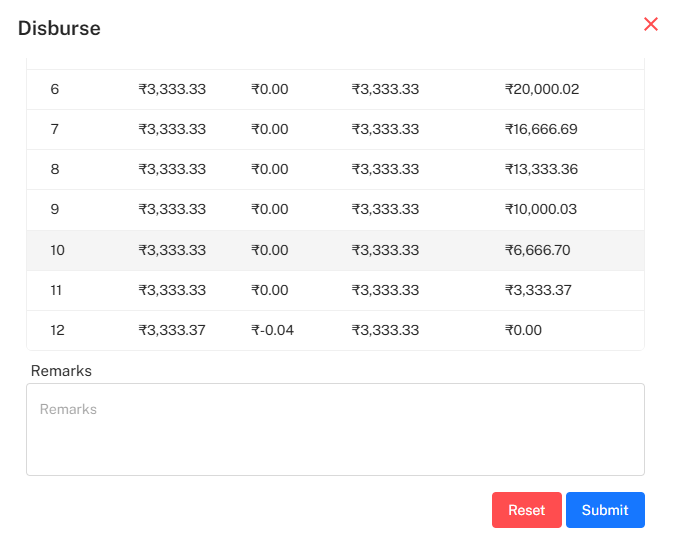 !EMI Breakdown Table
Automated Schedule Generation EMI Calculation Features:
-
Installment Details:
- Installment Number: Sequential payment identifiers
- Principal Amount: Principal component of each EMI
- Interest Amount: Interest component (e.g., ₹0.00 for interest-free loans)
- Total EMI: Sum of principal and interest for each installment
- Running Balance: Outstanding principal after each payment
-
Calculation Accuracy:
- Automatic rounding adjustments in final installment
- Precise allocation between principal and interest
- Clear visualization of repayment progression
- Zero-balance confirmation at loan completion
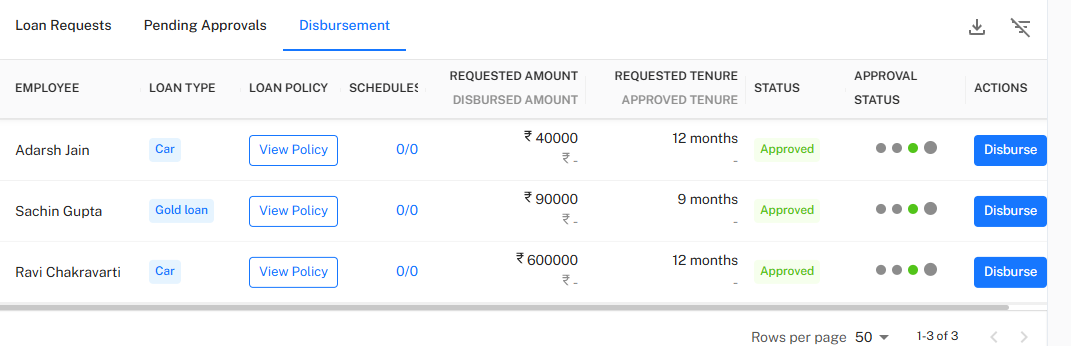
Loan Request Management Dashboard
Pending Approvals Overview
!Loan Requests Table
Centralized Request Management Comprehensive Request Tracking:
-
Request Information:
- EMPLOYEE: Employee identification and names
- LOAN TYPE: Category of loan (Personal, Car, Home, Gold loan)
- LOAN POLICY: Quick access to policy details via "View Policy"
-
Financial Details:
- REQUESTED AMOUNT: Original amount requested by employee
- DISBURSED AMOUNT: Actual amount approved for disbursement
- REQUESTED TENURE: Employee's preferred repayment period
- APPROVED TENURE: Final authorized repayment period
-
Status and Progress:
- STATUS: Current request stage (Pending, Approved, Disbursed)
- SCHEDULES: Progress indicator (e.g., "0/12" for new disbursements)
- APPROVAL STATUS: Visual indicators of approval progress
Status Lifecycle Management
Request Status Workflow Progressive Status Transitions:
- Pending: Initial submission awaiting review
- Approved: Request approved and ready for disbursement
- Disbursed: Funds released and repayment schedule active
- Cancelled: Request withdrawn or rejected
- Completed: Loan fully repaid according to schedule
Disbursement Actions and Operations
Approved Loan Processing
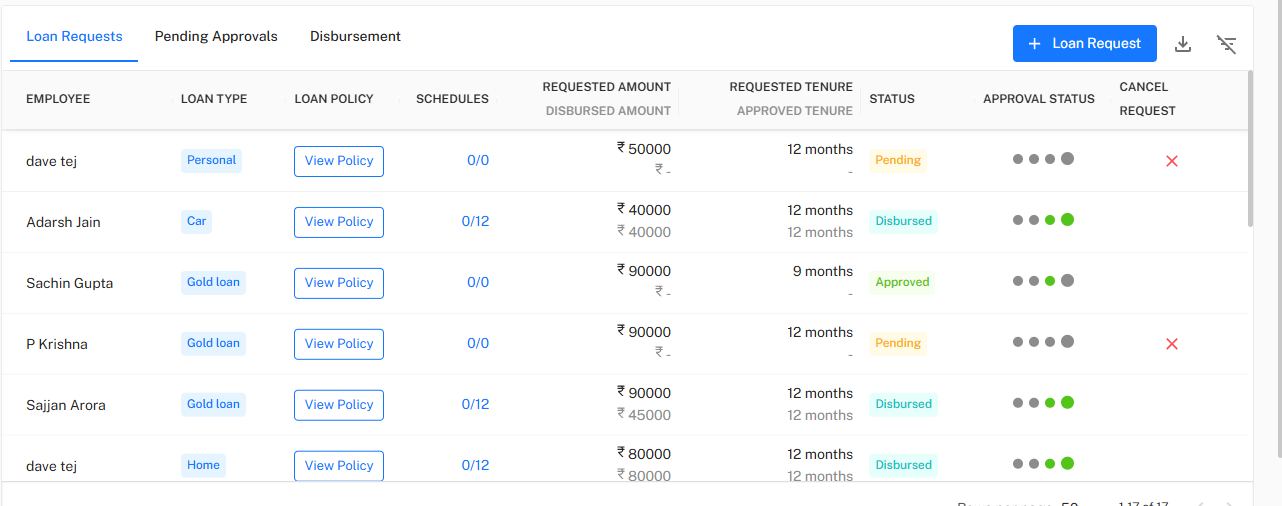
!Disbursement Actions Interface
Streamlined Disbursement Execution Action-Oriented Workflow:
-
Approved Request Identification:
- Filter and view loans with "Approved" status
- Identify ready-to-disburse loans with "Disburse" action button
- Verify all approval checkmarks are complete (✔✔✔✔✔)
-
Batch Processing Capabilities:
- Process multiple disbursements simultaneously
- Bulk approval and disbursement operations
- Consistent application of disbursement policies
-
Cancellation Management:
- Cancel pending requests before disbursement
- Maintain cancellation audit trails
- Prevent disbursement of cancelled requests
Policy Compliance Verification
Automated Eligibility Checks Pre-Disbursement Validation:
- Salary Verification: Cross-check against CTC and gross salary
- Experience Validation: Confirm employee meets experience criteria
- Policy Limits: Ensure disbursement amounts within policy maximums
- Active Loan Check: Verify employee doesn't exceed active loan limits
- Tenure Compliance: Confirm approved tenure within policy ranges
Financial Transparency Features
Employee-Facing Information
Clear Communication Transparent Disbursement Details:
- Policy Summary Display: Show employees their applicable loan terms
- Salary-Based Eligibility: Demonstrate how eligibility is calculated
- EMI Breakdown Visibility: Provide clear repayment schedule upfront
- Interest Rate Clarity: Explicitly show interest terms (e.g., "0% - No interest")
- Experience Consideration: Display how employee experience affects eligibility
Remarks and Documentation
Administrative Controls Disbursement Documentation:
- Remarks Field: Record special circumstances or notes
- Audit Trail: Maintain complete disbursement history
- Document Attachment: Link supporting documents to disbursements
- Approval Records: Track who approved and processed each disbursement
- Timeline Tracking: Record exact disbursement dates and times
Reporting and Analytics
Disbursement Performance
Comprehensive Reporting Disbursement Analysis Tools:
- Disbursement Volume Reports: Track loan distribution patterns
- Approval-to-Disbursement Timing: Measure processing efficiency
- Loan Type Distribution: Analyze popularity of different loan products
- Department-wise Analysis: Track disbursement patterns across organization
- Policy Compliance Reporting: Monitor adherence to loan policies
*Next: Explore the Loan Recovery and Delinquency Management for tracking repayments, handling defaults, and managing recovery processes.