Loan Request Approval Management
Last Updated: October 27,2025 Document Version: 1.0 **Prepared for:**Emgage HRMS Implementation Team
Streamlined Loan Processing The Loan Request Approval module enables administrators to review, approve, or reject employee loan-related requests such as EMI increases, tenure extensions, and skip requests in an organized and transparent manner.
Overview
Key Benefits This module provides administrators with:
- Centralized Control: View and manage all loan requests in one place.
- Real-Time Updates: Instantly reflect approval or rejection actions.
- Transparency: Maintain a clear audit trail of employee requests and actions.
- Efficiency: Approve or reject multiple requests with a single click.
Step-by-Step Process
Step 1: Access Request Approval Tab
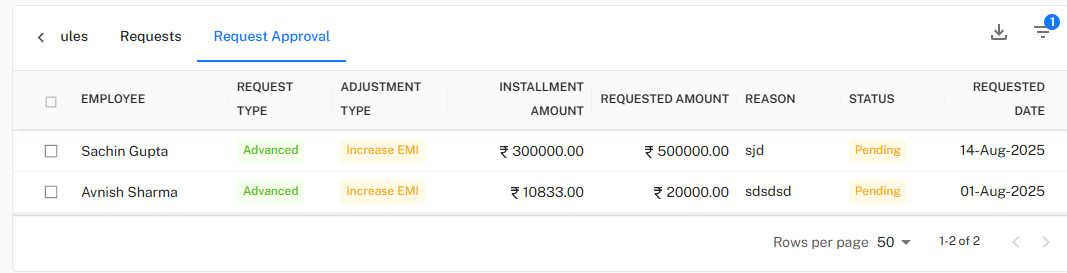
Navigate to Loan Schedules → Request Approval to view all pending requests.
Each record displays key details:
- Employee Name
- Request Type (e.g., Advanced, Skip)
- Adjustment Type (e.g., Increase EMI, Extend Tenure)
- Installment Amount
- Requested Amount
- Reason
- Status
- Requested Date
!Request Approval Page
Example For instance, both Sachin Gupta and Avnish Sharma have requested EMI adjustments marked as Pending.
Step 2: Select and Approve/Reject Requests
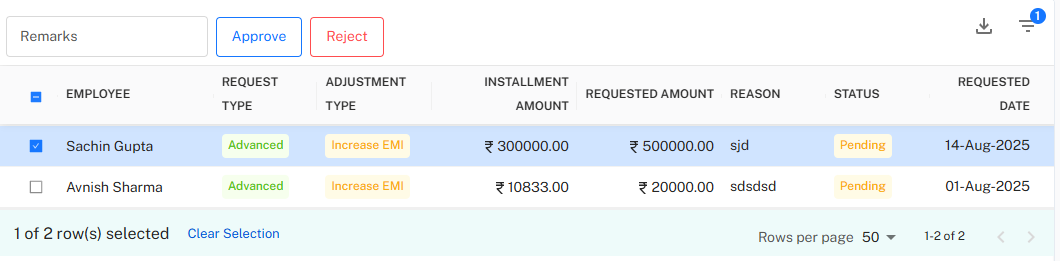
Click the checkbox beside one or more employee names to select requests.
!Selection and Action Buttons
You will see:
- A Remarks field for adding notes.
- Two action buttons:
- Approve
- Reject
Approval Workflow Process Steps:
- Select one or multiple requests.
- Add remarks (optional but recommended).
- Click Approve or Reject.
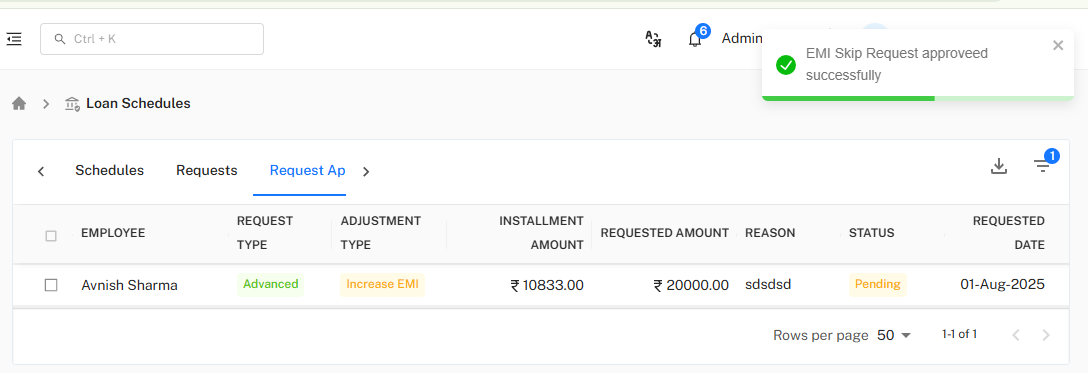
- The system confirms with a success notification.
Example:
After approving Sachin Gupta’s EMI Increase Request, the system displays:
"EMI Skip Request approved successfully"
Step 3: Review Approved and Pending Requests
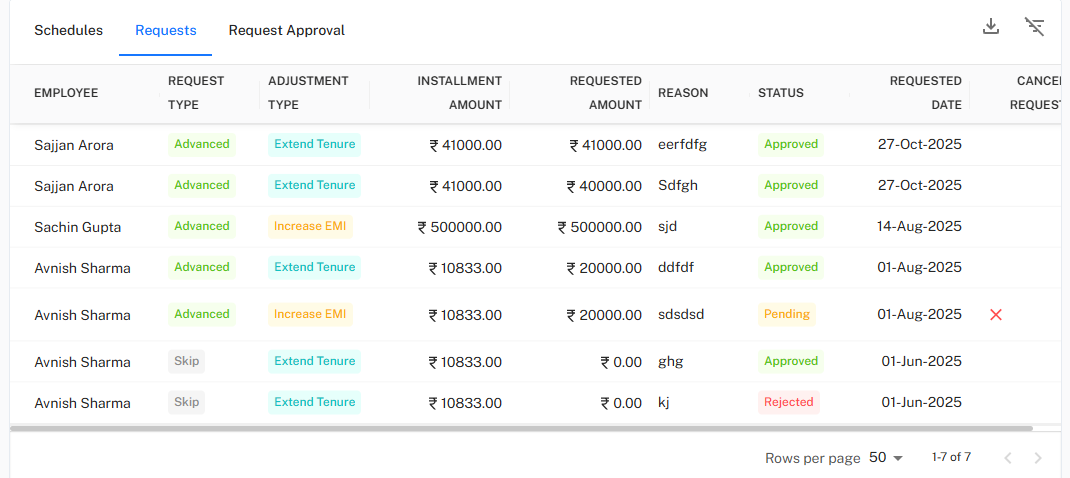 Navigate to the Requests tab to view all past and ongoing requests.
Each request is color-coded based on status:
- Approved – Request successfully processed.
- Pending – Awaiting admin action.
- Rejected – Request declined.
!Approved and Pending Requests List
Status Insights You can track multiple types of requests here:
- Extend Tenure requests approved for Sajjan Arora
- Increase EMI requests processed for Sachin Gupta and Avnish Sharma
- Skip requests with mixed approval statuses
Key Functional Highlights
Core Features
- Bulk Selection: Approve or reject multiple requests at once.
- Instant Feedback: Real-time success message confirmation.
- Request Tracking: View full request history per employee.
- Status Updates: Automatically refreshes upon action completion.
Next: Explore the Loan Schedule Module to monitor repayment timelines and EMI adjustments in real-time.