Loan Adjustment Request Approval
Last Updated: October 27,2025 Document Version: 1.0 **Prepared for:**Emgage HRMS Implementation Team
Centralized Request Management The request approval module provides a streamlined workflow for managing employee loan adjustment requests, enabling administrators to review, approve, and track modification requests with comprehensive filtering and status monitoring.
Request Approval Overview
Efficient Request Processing The request approval system offers centralized control over loan modifications, allowing organizations to:
- Streamline Approvals: Process adjustment requests through standardized workflows
- Maintain Compliance: Ensure all modifications follow organizational policies
- Track Request History: Maintain complete audit trails of all adjustment activities
- Enable Quick Decisions: Access all relevant information for informed approval decisions
- Manage Employee Flexibility: Provide structured flexibility in loan repayment terms
Advanced Request Filtering
Employee-Based Filtering
!Employee Filter Interface
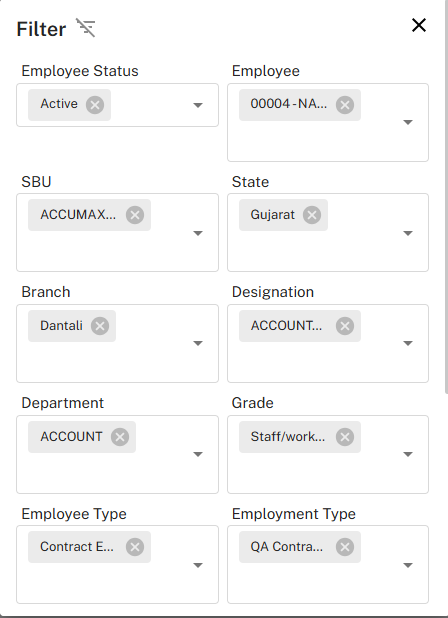
Targeted Request Management Employee Selection Filters:
-
Status and Identification:
- Employee Status: Filter by Active, Inactive, or specific employment status
- Employee Selection: Target specific employees by ID or name (e.g., "00004 - NA...")
-
Organizational Structure:
- SBU: Filter by Strategic Business Unit (e.g., "ACCUMAX...")
- Department: Target specific departments (e.g., "ACCOUNT")
- Branch: Filter by geographical locations (e.g., "Dantali")
-
Employment Details:
- Designation: Filter by job roles and positions
- Grade: Target specific employee grades (e.g., "Staff/work...")
- Employee Type: Categorize by Contract, Permanent, Temporary
- Employment Type: Filter by specific employment categories
Request-Specific Filtering
!Request Search Interface
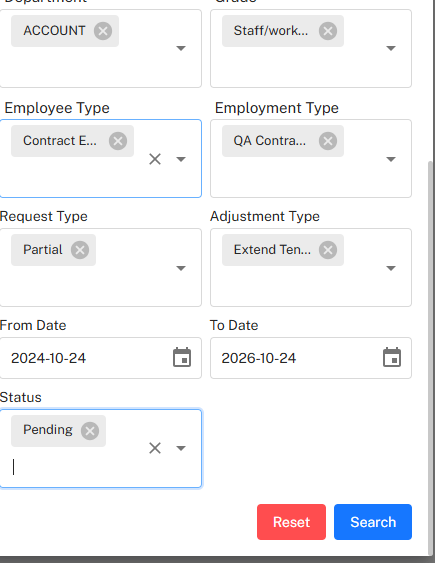
Precision Filtering Capabilities Advanced Search Parameters:
-
Employee Demographics:
- Department: Filter by organizational departments
- Employee Type: Target specific employment categories (e.g., "Contract E...")
- Employment Type: Refine by employment sub-categories
-
Request Characteristics:
- Request Type: Filter by Partial, Skip, or other adjustment types
- Adjustment Type: Target specific modification types (e.g., "Extend Ten...")
- Status: Filter by Pending, Approved, Rejected, or Cancelled status
-
Temporal Filters:
- From Date: Set start date for request search range
- To Date: Set end date for request search range
- Date Range: Comprehensive period-based filtering
Request Approval Dashboard
Approval Queue Management
!Request Approval Table
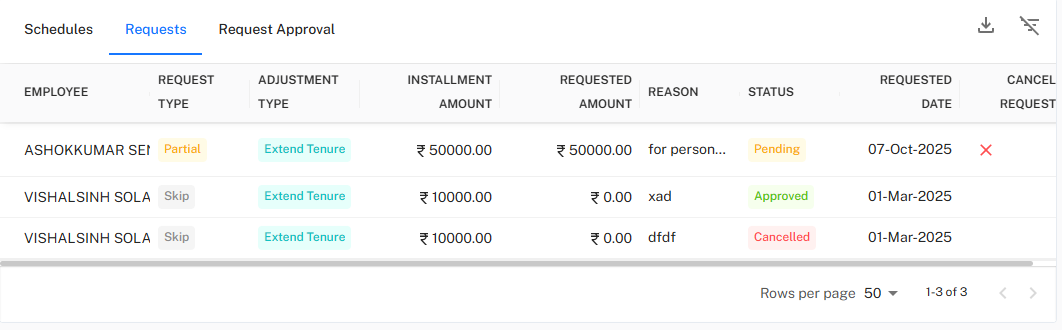
Comprehensive Request Oversight Request Management Interface:
-
Employee and Request Details:
- EMPLOYEE: View employee identification and names
- REQUEST TYPE: Identify the category of adjustment (Partial, Skip)
- ADJUSTMENT TYPE: View the specific modification requested (Extend Tenure)
-
Financial Information:
- INSTALLMENT AMOUNT: Original EMI amount due
- REQUESTED AMOUNT: Modified amount being requested
- REASON: Brief explanation for the adjustment request
-
Status and Timeline:
- STATUS: Current approval status (Pending, Approved, Cancelled)
- REQUESTED DATE: Date when the adjustment was requested
- Cancellation Option: Ability to cancel pending requests
Request Status Management
Status Workflow Request Lifecycle Stages:
- Pending: Request submitted and awaiting review/approval
- Approved: Request has been reviewed and approved
- Rejected: Request has been reviewed and denied
- Cancelled: Request was withdrawn or cancelled by system/administrator
- Processed: Approved request has been implemented in the schedule
Adjustment Request Types
Partial Payment Adjustments
Flexible Payment Options Partial Adjustment Features:
- Reduced EMI: Temporarily lower installment amounts during financial hardship
- Principal Focus: Option to pay principal only while deferring interest
- Gradual Increase: Schedule for gradually increasing payments over time
- Financial Relief: Provide temporary relief while maintaining loan continuity
Skip Payment Options
Payment Deferral Skip Payment Benefits:
- Temporary Relief: Allow employees to skip specific installments during emergencies
- Tenure Extension: Automatically extend loan tenure to accommodate skipped payments
- Interest Implications: Clear communication of interest accrual during skip periods
- Limited Usage: Controlled number of skip requests allowed per loan cycle
Tenure Extension Requests
Long-term Solutions Tenure Extension Advantages:
- Reduced EMI Burden: Lower monthly payments through extended repayment periods
- Structured Planning: Predictable long-term payment schedules
- Financial Stability: Help employees maintain financial stability during challenges
- Automated Recalculation: System automatically recalculates remaining installments
Approval Workflow Process
Review and Decision Making
Structured Approval Process Step-by-Step Approval Workflow:
- Request Receipt: Adjustment requests appear in the approval queue
- Initial Screening: Verify employee eligibility and request validity
- Financial Assessment: Review impact on loan recovery and organizational risk
- Policy Compliance: Ensure request aligns with organizational loan policies
- Approval Decision: Approve, reject, or request additional information
- Implementation: Automatically update loan schedules for approved requests
- Notification: Inform employees of decision and updated terms
Cancellation and Modification
Request Management Administrative Controls:
- Cancel Pending Requests: Administrators can cancel requests before approval
- Modification Rights: Adjust request parameters before approval if needed
- Bulk Operations: Process multiple requests simultaneously
- Audit Trail: Maintain complete history of all actions taken
Reporting and Analytics
Request Analysis
Comprehensive Reporting Approval Analytics:
- Approval Rate Analysis: Track approval patterns across departments
- Request Trend Monitoring: Identify seasonal patterns in adjustment requests
- Employee Behavior Insights: Understand common reasons for adjustments
- Processing Efficiency: Measure approval turnaround times
- Compliance Reporting: Generate reports for audit and compliance purposes
Next: Explore the **Loan Disbursement and Recovery Tracking for managing fund distribution, recovery monitoring, and delinquency management.*