Loan Schedule Management
Last Updated: October 27,2025 Document Version: 1.0 **Prepared for:**Emgage HRMS Implementation Team
Comprehensive Loan Tracking The loan schedule module provides complete visibility into employee loan repayments, enabling administrators to track EMI payments, monitor due dates, and process adjustment requests for flexible repayment management.
Loan Schedule Overview
Schedule Management Benefits The loan schedule dashboard offers comprehensive oversight of all active loan repayments, allowing organizations to:
- Track Payment Status: Monitor pending, paid, and adjusted EMI installments
- View Payment History: Access complete repayment timelines and transaction records
- Manage Due Dates: Track upcoming payment deadlines and overdue amounts
- Process Adjustments: Handle partial payments and tenure extensions
- Generate Reports: Analyze repayment patterns and employee compliance
Loan Schedule Dashboard
Schedule Monitoring Interface
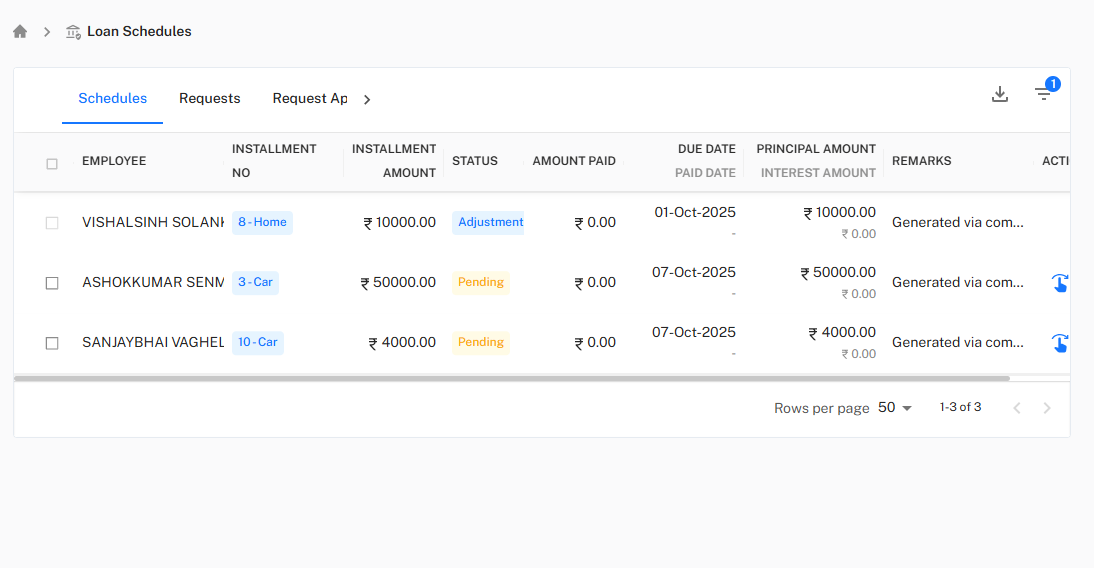
!Loan Schedules Table
Schedule Overview Features Comprehensive Schedule Monitoring:
-
Employee Information:
- EMPLOYEE: View employee names and identification
- INSTALLMENT NO: Track installment sequence and loan type (e.g., "8-Home", "3-Car")
-
Payment Details:
- INSTALLMENT AMOUNT: View due amount for each installment
- AMOUNT PAID: Track actual payments received
- STATUS: Monitor payment status (Pending, Paid, Adjustment)
-
Financial Breakdown:
- PRINCIPAL AMOUNT: View principal component of each installment
- INTEREST AMOUNT: Track interest component where applicable
- DUE DATE: Monitor payment deadlines
- PAID DATE: Record actual payment dates
Schedule Status Types
Payment Status Categories Status Definitions:
- Pending: Installment is due but not yet paid
- Paid: Installment has been successfully processed
- Adjustment: Installment has been modified through adjustment request
- Overdue: Payment past due date without settlement
EMI Adjustment Requests
Adjustment Request Processing
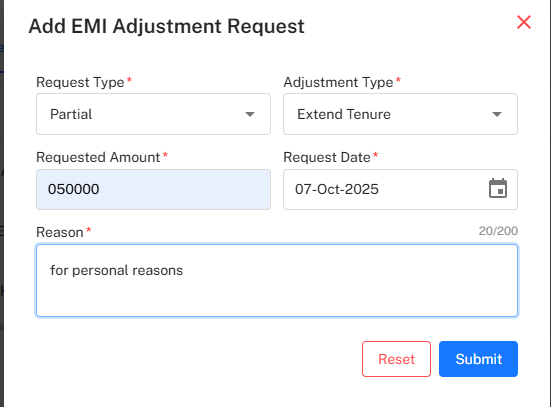
!EMI Adjustment Form
Flexible Repayment Management Adjustment Request Workflow:
-
Request Initiation:
- Request Type: Select the category of adjustment needed
- Adjustment Type: Choose between Partial payment or Tenure Extension
- Requested Amount: Specify the adjustment amount (e.g., 50,000)
-
Request Details:
- Request Date: Set the effective date for adjustment (e.g., 07-Oct-2025)
- Reason: Provide detailed explanation for the adjustment request
- Employee Validation: System verifies employee eligibility for adjustments
-
Request Processing:
- Reset: Clear the form to start over
- Submit: Process the adjustment request for approval
Adjustment Types
Adjustment Categories Available Adjustment Options:
- Partial Adjustment: Modify the installment amount while maintaining schedule
- Extend Tenure: Increase the repayment period with reduced EMIs
- Payment Holiday: Temporarily pause repayments with extended tenure
- One-time Settlement: Process early closure with negotiated amount
Advanced Filtering and Reporting
Employee Filter System
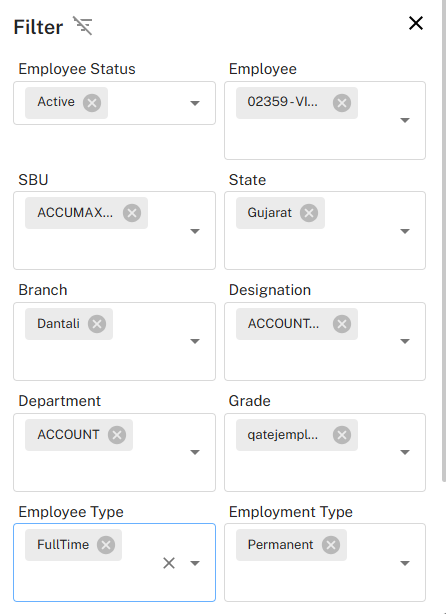
!Employee Filter Interface
Targeted Schedule Management Advanced Filtering Capabilities:
-
Employee Status Filters:
- Employee Status: Filter by Active, Inactive, or specific status
- Employee Selection: Target specific employees by ID or name
-
Organizational Filters:
- SBU: Filter by Strategic Business Unit
- Department: Target specific departments (e.g., ACCOUNT)
- Branch: Filter by geographical branches (e.g., Dantali)
-
Employment Filters:
- Designation: Filter by job roles (e.g., ACCOUNT...)
- Grade: Target specific employee grades
- Employee Type: Filter by FullTime, PartTime, Contract
- Employment Type: Categorize by Permanent, Temporary, Probation
Geographic and Regional Filters
Location-Based Management Regional Filtering Options:
- State: Filter by geographical states (e.g., Gujarat)
- Branch Specific: Target specific office locations
- Regional Compliance: Manage location-specific repayment rules
Schedule Actions and Operations
Installment Management
Operational Features Schedule Management Actions:
-
Payment Processing:
- Record manual payments and adjustments
- Process bulk payments for multiple employees
- Generate payment receipts and acknowledgments
-
Schedule Modifications:
- Adjust due dates for valid reasons
- Process partial payments with balance carry-forward
- Handle payment failures and retry mechanisms
-
Communication Features:
- Send payment reminders via email and notifications
- Generate overdue payment alerts
- Provide payment confirmation to employees
Reporting and Analytics
Comprehensive Reporting Schedule Analysis Tools:
- Payment Performance Reports: Track on-time payment rates
- Overdue Analysis: Identify patterns in delayed payments
- Adjustment Trends: Monitor frequency and reasons for adjustments
- Collection Efficiency: Measure overall collection performance
- Employee Compliance: Track individual repayment behavior
*Next: Explore the Loan Request Approval Workflow for managing loan applications, approval processes, and disbursement procedures.