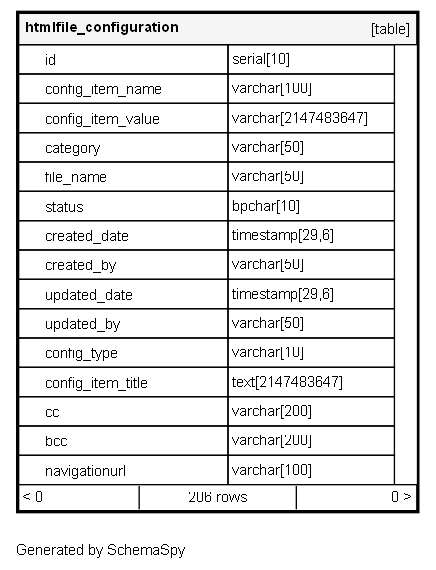
htmlfile_configuration

206 rows


Description

Module: HRMS Email Configuration
Purpose: Stores HTML email templates and notification configurations used across various system modules for automated communications.
Data: Contains complete HTML email templates with dynamic placeholders, styling, and business logic for different notification scenarios.
Process Usage:
- Serves as template repository for automated email notifications (TDS approvals, attendance alerts, probation processes).
- Provides configurable email templates with dynamic data binding using Thymeleaf expressions.
- Supports multiple communication types including emails, push notifications, and system alerts.
Key Points:
- Uses Thymeleaf templating engine for dynamic content rendering.
- Supports rich HTML formatting with embedded CSS and responsive design.
- Enables business users to customize email content without code changes.
Business Impact: Essential for automated employee communications, notification consistency, and brand-compliant messaging across the organization.

Columns

Column Type Size Nulls Auto Default Children Parents Comments
id serial 10 nextval('htmlfile_configuration_id_seq'::regclass)

Primary key
Format: Integer (auto-increment)
Used as: Unique identifier for each template configuration.

config_item_name varchar 100 null

Unique identifier key for the template
Format: String
Examples: “probation_process_email”, “attendance_short_fall”, “tds_approved”, “tds_rejected”, “tds_request”
Usage: Used by application code to reference specific templates in business logic.

config_item_value varchar 2147483647 null

Complete HTML email template with dynamic placeholders
Format: Long Text (HTML content)
Content: Full HTML email template with CSS styling and Thymeleaf expressions
Thymeleaf Syntax: ${bodyMsgData
Usage: Rendered by email service with dynamic data to generate final email content.

category varchar 50 null

Functional category grouping related templates
Format: String
Examples: “probation_process_email”, “attendance_short_fall”, “tds_approved”
Usage: Organizes templates by business process for easier management and reporting.

file_name varchar 50 null

Template file reference name
Format: String
Examples: “probation_process_email”, “attendance_short_fall”, “tds_approved”
Usage: Typically matches config_item_name, used for file-based template references.

status bpchar 10 null

Template activation status
Format: String
Values: “Active”, “Inactive”, “Draft”
Usage: Controls whether template is available for use in automated communications.

created_date timestamp 29,6 null
created_by varchar 50 null
updated_date timestamp 29,6 null
updated_by varchar 50 null
config_type varchar 10 null

Type of communication configuration
Format: String
Values: “MAIL”, “FCM” (Firebase Cloud Messaging), “SMS”, “SYSTEM”
MAIL: HTML email templates
FCM: Push notification templates
Usage: Determines how the template is processed and delivered.

config_item_title text 2147483647 null

Human-readable title for the template
Format: String
Examples: “Probation Process Email”, “Attendance Short Fall Alert”, “TDS Approval Notification”
Usage: Displayed in admin interfaces for template selection and management.

cc varchar 200 null

Carbon copy email recipients
Format: String (comma-separated emails)
Example:demo1234@demo.com
Usage: Additional recipients who should receive copies of emails sent using this template.

bcc varchar 200 null

Blind carbon copy email recipients
Format: String (comma-separated emails)
Usage: Hidden recipients who should receive copies without other recipients knowing.

navigationurl varchar 100 null

URL or navigation reference for template context
Format: String
Examples: “TDS Approved”, “TDS Rejected”
Usage: Provides additional context or links related to the template content.

Relationships