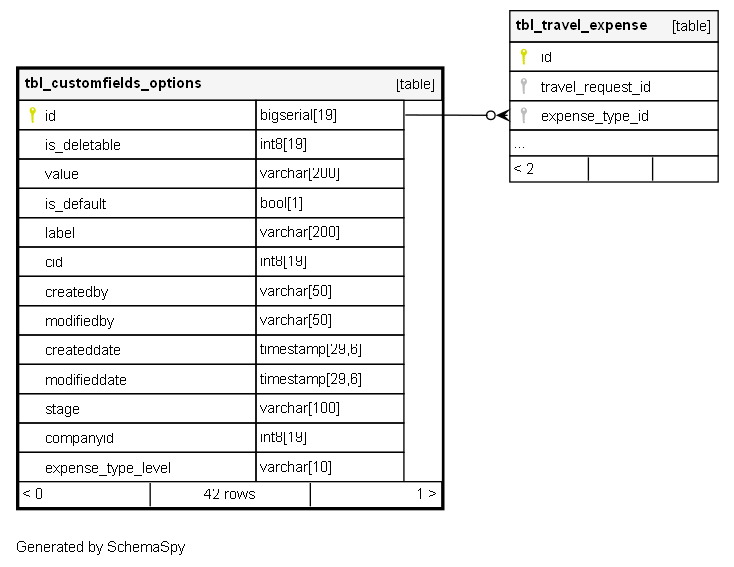
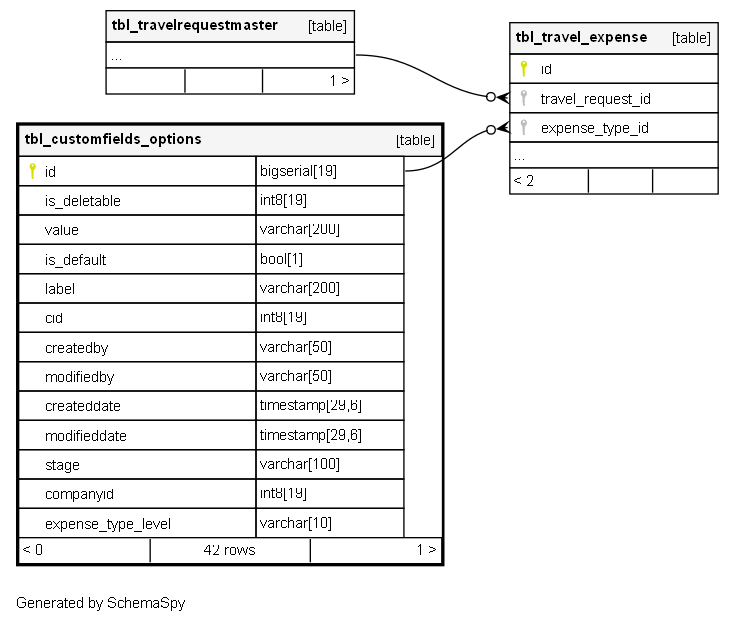
tbl_customfields_options

42 rows


Description

Module: HRMS Expense Management
Purpose: Provides configurable option values for custom expense fields, dropdown selections, and lookup lists across the expense management system.
Data: Each row represents a predefined option value that can be used in custom expense fields, dropdown menus, and selection lists with configurable status and company-specific scoping.
Process Usage:
- Defines available options for custom expense field dropdowns and selection lists.
- Manages option lifecycle (active/inactive/deleted) and company-specific customizations.
- Supports expense type level filtering for context-specific option availability.
Key Points:
- Reusable option repository for consistent dropdown values across expense forms.
- Company-level isolation for multi-tenant implementations.
- Flexible option management with deletable and default value flags.
Business Impact: Enables consistent data entry, reduces manual input errors, and provides flexible configuration for expense categorization and classification.

Columns

Column Type Size Nulls Auto Default Children Parents Comments
id bigserial 19 nextval('tbl_customfields_options_id_seq'::regclass)
tbl_travel_expense.expense_type_id fk_tbl_travel_expense_expense_type_id R

Primary key
Format: Long (auto-increment)
Used as: Unique identifier for each custom field option.

is_deletable int8 19 '1'::bigint

Format: Integer (0 or 1)
Purpose: Controls whether this option can be deleted from the system.
Values:
- 1: Option can be deleted (custom/user-created options)
- 0: Option cannot be deleted (system-critical options)
Business Logic: Protects system-required options from accidental deletion while allowing custom option management.

value varchar 200 null

Format: String
Purpose: The actual value stored in the database when this option is selected.
Usage: Used as the internal identifier for the option in expense records and calculations.
Examples: “TRAVEL”, “MEAL”, “ACCOMMODATION”, “PROJECT_A”
Note: Typically matches label for simplicity, but can differ for technical values.

is_default bool 1 null

Flag Type: Boolean
Purpose: Indicates if this option should be preselected as the default value.
Business Logic:
- TRUE: This option is automatically selected when creating new expense records
- FALSE: No default selection
- NULL: No default behavior specified
Usage: Improves user experience by preselecting common options.

label varchar 200 null

Format: String
Purpose: Human-readable display text shown to users in dropdowns and selection lists.
Usage: User interface display for option selection.
Examples: “Travel Expense”, “Client Meal”, “Hotel Accommodation”, “Project Alpha”
Business Rule: Usually matches value field for consistency.

cid int8 19 null

FK: public.tbl_customfields.id or similar parent table
Purpose: Links this option to its parent custom field definition.
Usage: Establishes hierarchical relationship between custom fields and their available options.
Example: Options for “Expense Category” field would all have same cid reference.

createdby varchar 50 null
modifiedby varchar 50 null
createddate timestamp 29,6 null
modifieddate timestamp 29,6 null
stage varchar 100 null

Format: String
Purpose: Controls the active status and availability of the option.
Values: “Active”, “Inactive”, “Deleted”
Workflow:
- “Active”: Option is available for selection in expense forms
- “Inactive”: Option is hidden but preserved for historical data
- “Deleted”: Option is soft-deleted and unavailable
Default: “Active” for new options.

companyid int8 19 null

FK: public.tbl_company.CompanyId
Purpose: Scopes the option to a specific company in multi-tenant implementations.
Usage: Enables company-specific custom field options while maintaining data isolation.
Business Use: Different companies can have different expense categories and options.

expense_type_level varchar 10 null

Format: Enum (BOTH, EMPLOYEE, APPROVER)
Purpose: Defines at which level this expense type option is available in the workflow.
Values from ExpensePolicyConstants.EXPENSE_TYPE_LEVEL:
- BOTH: Available to both employees and approvers
- EMPLOYEE: Only available to employees during expense submission
- APPROVER: Only available to approvers during expense processing
Default: BOTH
Usage: Controls option visibility based on user role in expense workflow.

Indexes

Constraint Name Type Sort Column(s)
tbl_customfields_options_pk__tbl_cust__3214ec07f0bf7c28 Primary key Asc id

Relationships