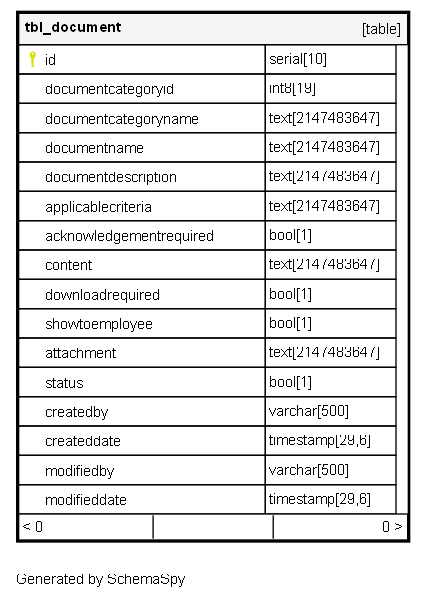
tbl_document

-1 rows


Description

Module: HRMS Document Module
Purpose: Central repository for all organizational documents, policies, and compliance materials with advanced targeting and access control.
Data: Each row represents a document or policy that can be targeted to specific employee groups based on organizational criteria.
Process Usage:
- Stores company policies, manuals, compliance documents, and HR materials.
- Enables targeted document distribution using JSON-based criteria rules.
- Controls document visibility and access through employee self-service portal.
Key Points:<br-**Advanced targeting system using JSON criteria for precise document distribution.
- Flexible access controls with download and acknowledgment requirements.
- Integrated with employee verification and assignment workflows.
Business Impact: Ensures right employees access relevant documents, maintains policy compliance, and provides centralized document management.

Columns

Column Type Size Nulls Auto Default Children Parents Comments
id serial 10 nextval('tbl_document_id_seq'::regclass)

Primary key
Format: Long (auto-increment)
Used as: Unique identifier for each document record.

documentcategoryid int8 19 null

FK: public.tbl_documentcategory.id
Purpose: Categorizes the document for organizational structure and filtering.
Examples: 8=Compliance, 12=HR Manuals, 10=Policies, 9=Legal
Usage: Enables document grouping and category-based management.

documentcategoryname text 2147483647 null

Format: String
Purpose: Human-readable category name for display and reporting.
Examples: “HR MANNUAL”, “Compliance”, “Policies”, “Legal Documents”
UI Usage: Displayed in document libraries and category filters.

documentname text 2147483647 null

Format: String
Purpose: Official name/title of the document.
Examples: “HR MANNUAL”, “Code of conduct”, “Employee Handbook”, “Safety Policy”
Business Use: Primary identifier for document selection and search.

documentdescription text 2147483647 null

Format: String
Purpose: Detailed description explaining the document’s purpose and content.
Usage: Helps employees understand document relevance and context before accessing.
Examples: “Company HR policies and procedures manual”, “Code of conduct for all employees”

applicablecriteria text 2147483647 null

Format: JSON Rule Engine Syntax
Purpose: Defines which employees should have access to this document based on organizational attributes.
Syntax: JSON logic with employee field comparisons
Examples:
- SBU Filtering: {"and":[{"in":[{"var":"SBU"},[2,3,4,5,6,7,8,9,10,11,12,13]]}]}
- Department Rules: {"and":[{"in":[{"var":"Department"},["HR","Finance"]]}]}
- Multi-condition: {"and":[{"in":[{"var":"SBU"},[2,3]]},{"==":[{"var":"EmploymentType"},"FullTime"]}]}
Business Logic: Dynamic document assignment based on employee master data.

acknowledgementrequired bool 1 false

Flag Type: Boolean
True: Employees must formally acknowledge reading this document
False: Document is for reference only, no acknowledgment needed
Usage: Critical for compliance documents, policies, and legal agreements.

content text 2147483647 null

Format: HTML Text or Rich Text
Purpose: Stores document content for inline viewing (optional).
Usage: Alternative to file attachments for simple documents or policies.
Examples: Policy text, announcement content, procedural guidelines.

downloadrequired bool 1 false

Flag Type: Boolean
True: Employees must download the document to access it
False: Document can be viewed online without download
Business Use: Controls document distribution method and tracking.

showtoemployee bool 1 true

Flag Type: Boolean
True: Document is visible to employees in ESS portal
False: Document is hidden from employee view (admin-only)
Usage: Manages document visibility and access permissions.

attachment text 2147483647 null

Format: String (File path or reference)
Purpose: Reference to the actual document file stored in external storage.
Pattern: {DocumentName}_{timestamp}.{extension}
Examples: “HR_MANUAL_1733392584982.pdf”, “COC_1674195121797.pdf”
Storage: Typically Amazon S3 or similar cloud storage service.

status bool 1 true

Flag Type: Boolean
True: Document is active and available for assignment
False: Document is inactive and hidden from all interfaces
Workflow: Allows version control and document lifecycle management.

createdby varchar 500 null
createddate timestamp 29,6 null
modifiedby varchar 500 null
modifieddate timestamp 29,6 null

Indexes

Constraint Name Type Sort Column(s)
tbl_document_pkey Primary key Asc id

Relationships