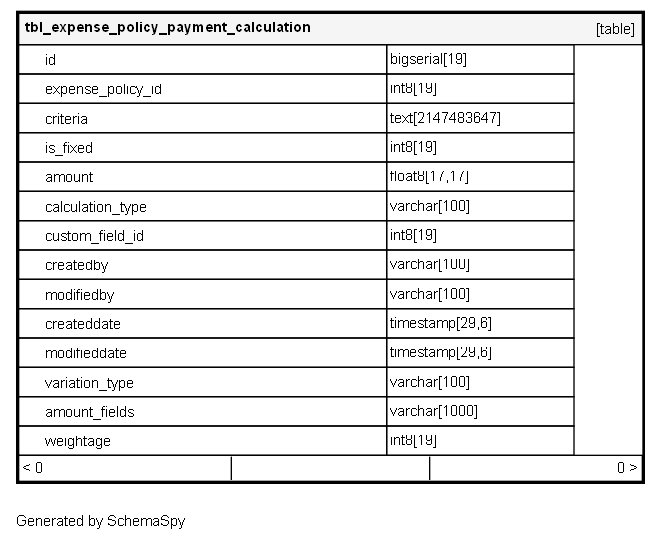
tbl_expense_policy_payment_calculation

-1 rows


Description

Module: HRMS Expense Management
Purpose: Defines complex, multi-criteria payment calculation rules for expense policies, enabling sophisticated amount computations based on multiple conditions and custom fields.
Data: Each row represents a specific payment calculation rule that can be applied to expense claims, supporting fixed amounts, variable calculations, and conditional logic based on custom field values.
Process Usage:
- Configures multiple calculation methods for a single expense policy with conditional application.
- Enables tiered, slab-based, or formula-driven payment calculations.
- Supports integration with custom expense fields for dynamic amount determination.
Key Points:
- Multiple calculation rules per policy with weighted priority system.
- Flexible criteria-based rule application using JSON conditions.
- Support for both fixed amounts and dynamic calculations.
Business Impact: Enables sophisticated expense reimbursement calculations, supports complex policy structures, and provides flexibility for organization-specific payment rules.

Columns

Column Type Size Nulls Auto Default Children Parents Comments
id bigserial 19 nextval('tbl_expense_policy_payment_calculation_id_seq'::regclass)

Primary key
Format: Long (auto-increment)
Used as: Unique identifier for each payment calculation rule.

expense_policy_id int8 19 null

FK: public.tbl_expense_policy.id
Purpose: Links this calculation rule to its parent expense policy.
Cardinality: Many-to-One (multiple calculation rules per policy)
Usage: Groups related calculation rules under a single policy umbrella.
Business Logic: Rules are evaluated in weightage order when multiple rules apply to same expense.

criteria text 2147483647 null

Format: String (JSON Rule Engine Syntax)
Purpose: Defines the conditions under which this calculation rule should be applied.
JSON Structure Examples:
- Location-based: {"location": "MUMBAI"}
- Amount-based: {"claimedAmount": {"gte": 1000}}
- Custom field-based: {"projectType": "INTERNAL"}
- Time-based: {"travelTime": {"gte": "18:00"}}
- Composite conditions with AND/OR logic
Usage: Determines rule applicability based on expense attributes and context.

is_fixed int8 19 null

Format: Long (0/1)
Purpose: Indicates whether this rule uses a fixed amount or dynamic calculation.
Values:
- 1: Fixed amount (use “amount” field)
- 0: Variable amount (use calculation_type and amount_fields)
Usage: Determines the calculation methodology for this rule.

amount float8 17,17 null

Format: Double
Purpose: Fixed reimbursement amount when is_fixed = 1.
Usage: Simple fixed-amount reimbursement rules.
Examples: 500.00 (fixed daily allowance), 200.00 (fixed transportation cost)

calculation_type varchar 100 null

Format: String
Purpose: Defines the type of calculation method for variable amounts.
Common Values:
- “PERCENTAGE”: Percentage of claimed amount
- “SLAB_BASED”: Tiered amount based on slabs
- “FORMULA”: Mathematical formula-based calculation
- “CUSTOM_FIELD_BASED”: Amount derived from custom field values
- “DISTANCE_BASED”: Amount based on distance traveled
- “TIME_BASED”: Amount based on time duration
Usage: Determines how variable amounts are calculated.

custom_field_id int8 19 null

FK: public.tbl_customfields.id
Purpose: References a custom field whose value influences the calculation.
Usage: Enables dynamic calculations based on custom expense field values.
Examples: Project code, client type, travel class, accommodation type

createdby varchar 100 null
modifiedby varchar 100 null
createddate timestamp 29,6 null
modifieddate timestamp 29,6 null
variation_type varchar 100 null

Format: String
Purpose: Defines how amount variations are handled within this calculation rule.
Examples:
- “FIXED”: No variation
- “RANGE”: Amount within min-max range
- “TIERED”: Different amounts for different tiers
- “GRADUATED”: Progressive amounts based on thresholds
Usage: Complex amount variation scenarios.

amount_fields varchar 1000 null

Format: String (JSON)
Purpose: Configuration for complex calculation scenarios with multiple components.
JSON Structure Examples:
- Percentage-based: {"percentage": 80, "baseField": "claimedAmount"}
- Slab-based: {"slabs": [{"max": 100, "amount": 50}, {"max": 200, "amount": 80}, {"default": 100}]}
- Formula-based: {"formula": "baseAmount * multiplier + fixedAllowance"}
- Multi-component: {"components": ["hotel", "meal", "transport"]}
Usage: Defines parameters for complex calculation methods.

weightage int8 19 null

Format: Long
Purpose: Determines evaluation priority when multiple rules match the criteria.
Usage:
- Higher weightage rules are evaluated first
- Rules with same weightage may be evaluated in sequence or combined<br- Used to resolve conflicts when multiple rules apply
Business Logic: First matching rule with highest weightage typically determines the final amount.

Relationships