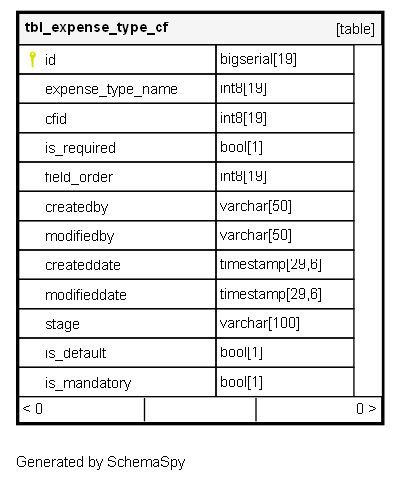
tbl_expense_type_cf

-1 rows


Description

Module: HRMS Expense Management
Purpose: Manages the assignment of custom fields to specific expense types, controlling field visibility, requirements, and display order in expense submission forms.
Data: Each row represents a custom field assigned to an expense type, defining its behavior, presentation order, and mandatory status within that specific expense context.
Process Usage:
- Configures which custom fields appear for different expense types (Travel, Meals, Accommodation, etc.).
- Controls field ordering, requirement rules, and default values per expense type.
- Manages custom field lifecycle and availability across different expense categories.
Key Points:
- Many-to-Many relationship between expense types and custom fields with additional configuration.
- Granular control over field behavior per expense type context.
- Supports staged rollout and retirement of custom fields.
Business Impact: Enables tailored expense capture experiences, ensures relevant data collection for different expense categories, and provides flexible field management across the organization.

Columns

Column Type Size Nulls Auto Default Children Parents Comments
id bigserial 19 nextval('tbl_expense_type_cf_id_seq'::regclass)

Primary key
Format: Long (auto-increment)
Used as: Unique identifier for each expense type custom field assignment.

expense_type_name int8 19 null

FK: public.tbl_customfields_options.id
Purpose: Links to the expense type definition through custom field options.
Usage: Identifies which expense type this custom field configuration applies to.
Business Logic: Uses CustomFieldsOptions to represent expense types, enabling consistent option management.
Examples: “Travel Expense”, “Meal Allowance”, “Hotel Accommodation”, “Client Entertainment”

cfid int8 19 null

FK: public.tbl_customfields.id
Purpose: References the custom field being assigned to the expense type.
Usage: Defines which custom field appears for this expense type.
Examples: “Project Code”, “Client Name”, “Business Purpose”, “Cost Center”
Cardinality: Many-to-One (same custom field can be assigned to multiple expense types)

is_required bool 1 null

Flag Type: Boolean
Purpose: Determines if this field must be filled out when submitting expenses of this type.
Business Logic:
- TRUE: Field is mandatory for expense submission
- FALSE: Field is optional and can be skipped
Usage: Ensures necessary data collection for specific expense types while allowing flexibility for others.

field_order int8 19 null

Format: Long
Purpose: Controls the display sequence of custom fields in expense submission forms.
Usage: Lower numbers appear first in the form layout.
Business Logic:
- 1: First field in custom fields section
- 2: Second field, etc.
- NULL: Default ordering (typically alphabetical)
UI Impact: Ensures consistent and logical field arrangement for better user experience.

createdby varchar 50 null
modifiedby varchar 50 null
createddate timestamp 29,6 null
modifieddate timestamp 29,6 null
stage varchar 100 null

Format: String
Purpose: Controls the active status and availability of this field assignment.
Common Values:
- “ACTIVE”: Field is available and visible in expense forms
- “INACTIVE”: Field is hidden but configuration preserved
- “DRAFT”: Field assignment under configuration, not yet active
- “ARCHIVED”: Historical assignment no longer in use
Workflow: Manages field assignment lifecycle from testing to production to retirement.

is_default bool 1 null

Flag Type: Boolean
Purpose: Indicates if this field assignment is the default configuration.
Business Logic:
- TRUE: This is the standard field assignment for the expense type
- FALSE: Custom or exceptional assignment
Usage: Helps distinguish between standard field assignments and custom configurations.

is_mandatory bool 1 null

Flag Type: Boolean
Purpose: Additional enforcement level beyond basic requirement.
Business Logic:
- TRUE: System-enforced mandatory field (cannot be bypassed)
- FALSE: Standard requirement that might have exceptions
Usage Distinction:
- is_required: Basic requirement flag
- is_mandatory: Strict enforcement with system validation
Examples: Legal compliance fields might be mandatory, while business process fields might be just required.

Indexes

Constraint Name Type Sort Column(s)
tbl_expense_type_cf_pk__tbl_expe__3214ec07ec292c29 Primary key Asc id

Relationships