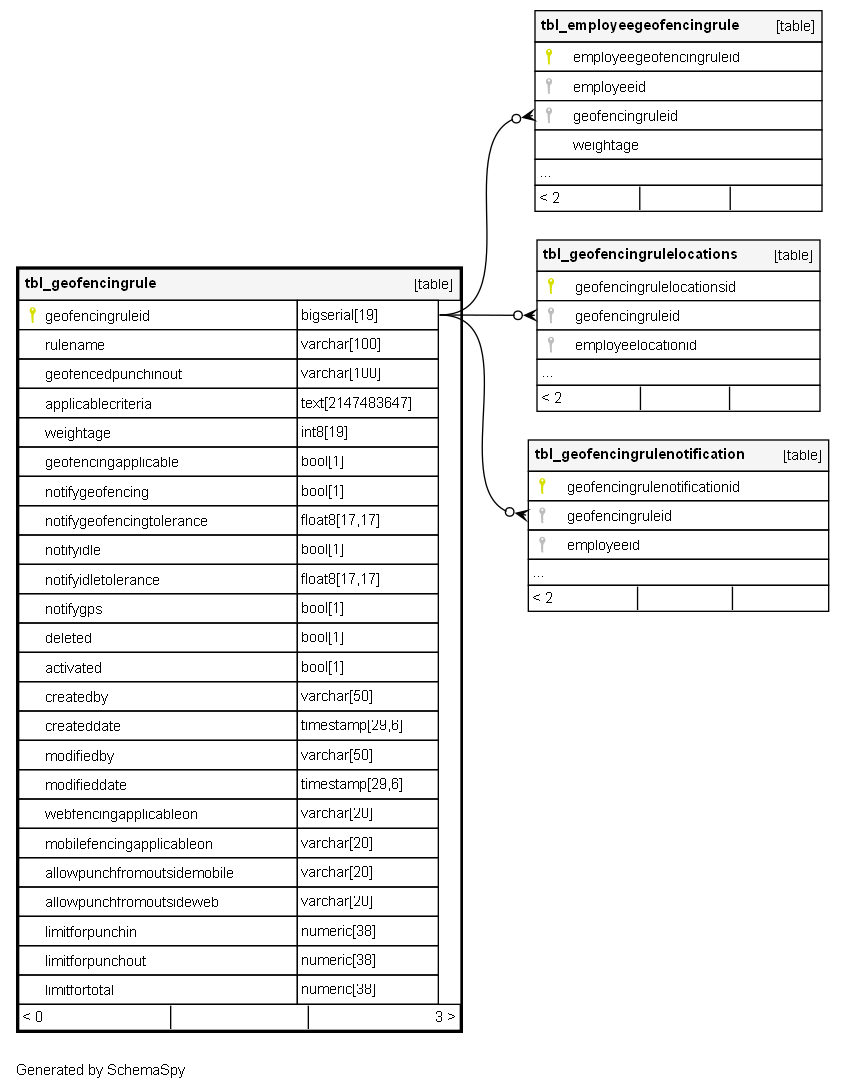
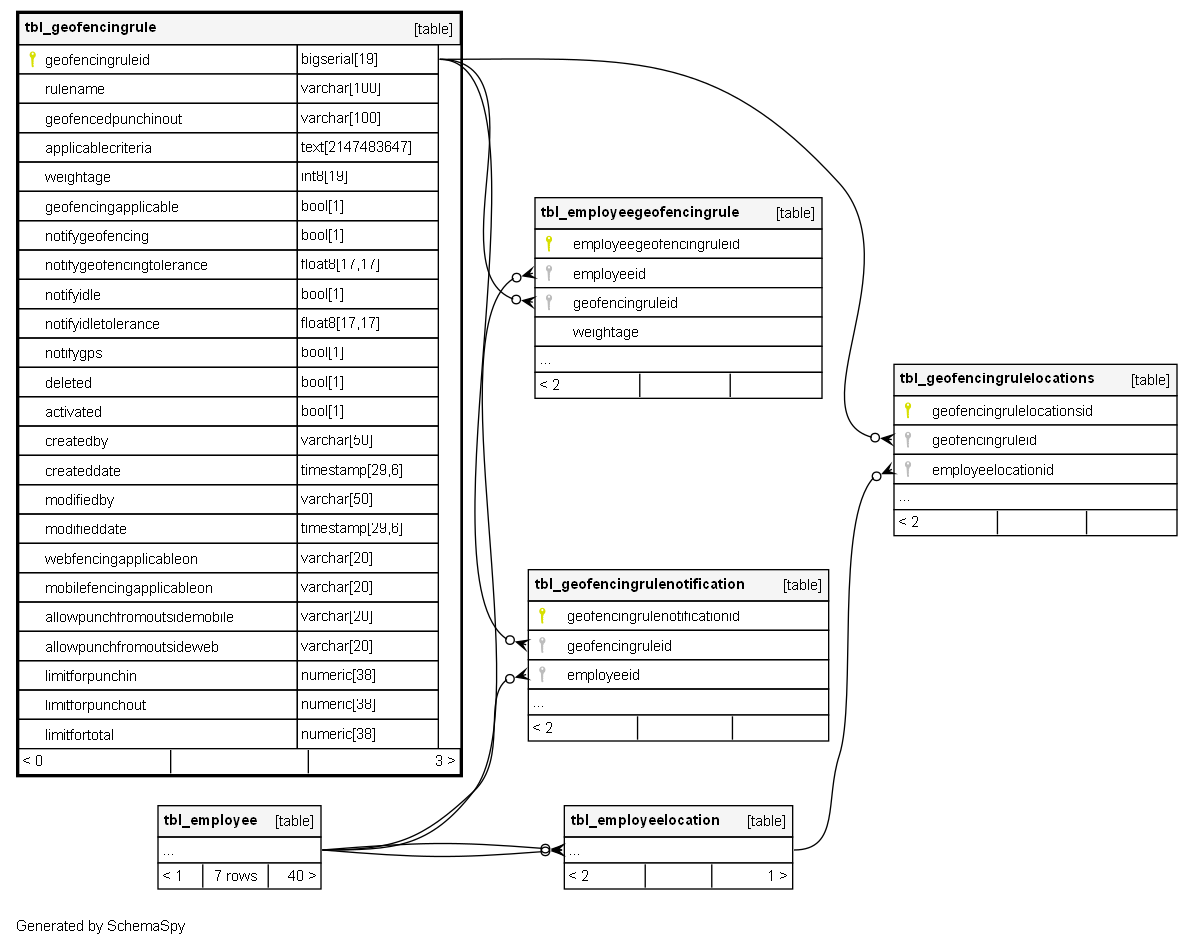
tbl_geofencingrule

-1 rows


Description

Module: HRMS Geo-fencing Module
Purpose: Defines comprehensive geo-fencing rules for employee location tracking, attendance validation, and movement monitoring with configurable notifications and compliance controls.
Data: Each row represents a complete geo-fencing rule configuration including location boundaries, notification triggers, punch validation, and employee eligibility criteria.
Process Usage:
- Configures virtual boundaries for employee attendance and location compliance.
- Defines notification rules for movement, idle time, and GPS status changes.
- Controls punch-in/out validation and exception handling across different platforms.
Key Points:
- Multi-location geo-fencing with configurable boundaries and tolerances.
- Cross-platform support (Mobile/Web) with different rule sets.
- Comprehensive notification system for compliance monitoring.
Business Impact: Ensures accurate attendance tracking, enables field employee monitoring, provides real-time compliance alerts, and maintains location-based workforce management.

Columns

Column Type Size Nulls Auto Default Children Parents Comments
geofencingruleid bigserial 19 nextval('tbl_geofencingrule_geofencingruleid_seq'::regclass)
tbl_employeegeofencingrule.geofencingruleid fk_tbl_employeegeofencingrule_geofencingruleid R
tbl_geofencingrulelocations.geofencingruleid fk_tbl_geofencingrulelocations_geofencingruleid R
tbl_geofencingrulenotification.geofencingruleid fk_tbl_geofencingrulenotification_geofencingruleid R

Primary key
Format: Long (auto-increment)
Used as: Unique identifier for each geo-fencing rule.

rulename varchar 100 null

Format: String
Purpose: Human-readable name identifying the geo-fencing rule.
Examples: “Office Attendance Zone”, “Client Site Monitoring”, “Field Staff Tracking”, “Remote Work Perimeter”
Usage: Displayed in rule selection interfaces and reports.

geofencedpunchinout varchar 100 null

Format: String
Purpose: Defines which punch operations are restricted by geo-fencing.
Common Values:
- “BOTH”: Both punch-in and punch-out require geo-fencing compliance
- “PUNCH_IN_ONLY”: Only punch-in requires location validation
- “PUNCH_OUT_ONLY”: Only punch-out requires location validation
- “NONE”: No punch restrictions based on location
Usage: Controls attendance validation strictness.

applicablecriteria text 2147483647 null

Format: String (JSON Rule Engine Syntax)
Purpose: Defines which employees are subject to this geo-fencing rule based on organizational attributes.
JSON Structure Examples:
- Department-based: {"department": ["SALES", "FIELD_OPS"]}
- Location-based: {"officeLocation": ["MUMBAI", "DELHI"]}
- Role-based: {"role": ["FIELD_STAFF", "REMOTE_WORKER"]}
- Composite rules with AND/OR logic
Usage: Dynamic rule assignment based on employee master data.

weightage int8 19 null

Format: Long
Purpose: Priority weight for rule evaluation when multiple rules apply to same employee.
Usage: Higher weightage rules take precedence in conflict resolution.
Business Logic: Used to determine which rule applies when employee qualifies for multiple geo-fencing rules.

geofencingapplicable bool 1 null

Flag Type: Boolean
Purpose: Master switch for geo-fencing enforcement.
Values:
- TRUE: Geo-fencing is active and enforced
- FALSE: Geo-fencing is disabled (rule exists but not enforced)
Usage: Quick enable/disable of entire geo-fencing rule without deleting configuration.

notifygeofencing bool 1 null

Flag Type: Boolean
Purpose: Enables notifications when employees move outside geo-fenced boundaries.
Values:
- TRUE: Send alerts when boundary violations occur
- FALSE: No boundary violation notifications
Usage: Real-time monitoring of employee movement compliance.

notifygeofencingtolerance float8 17,17 null

Format: Float (Minutes)
Purpose: Grace period before sending boundary violation notifications.
Usage: Allows temporary boundary exits without immediate alerts.
Examples: 5.0 (5-minute grace period), 15.0 (15-minute tolerance)
Business Logic: Prevents false alarms for brief boundary crossings.

notifyidle bool 1 null

Flag Type: Boolean
Purpose: Enables notifications when employees remain idle at one location.
Values:
- TRUE: Monitor and alert for extended idle time
- FALSE: No idle time monitoring
Usage: Productivity monitoring and safety checks for field staff.

notifyidletolerance float8 17,17 null

Format: Float (Minutes)
Purpose: Time threshold for idle location notifications.
Usage: Defines how long employee can remain stationary before alert triggers.
Examples: 30.0 (30 minutes idle), 120.0 (2 hours idle)
Business Logic: Balances productivity monitoring with reasonable break periods.

notifygps bool 1 null

Flag Type: Boolean
Purpose: Enables notifications for GPS status changes (ON/OFF).
Values:
- TRUE: Alert when GPS is turned off during working hours
- FALSE: No GPS status monitoring
Usage: Ensures location tracking reliability and detects potential tampering.

deleted bool 1 null

Flag Type: Boolean (Soft Delete)
Purpose: Marks the rule as deleted while preserving historical data.
Values:
- TRUE: Rule is soft-deleted and inactive
- FALSE: Rule is active or available
Usage: Maintains referential integrity for historical tracking data.

activated bool 1 null

Flag Type: Boolean
Purpose: Controls whether the rule is currently active and enforceable.
Values:
- TRUE: Rule is active and being enforced
- FALSE: Rule is configured but not currently active
Usage: Temporary deactivation without deleting rule configuration.

createdby varchar 50 null
createddate timestamp 29,6 null
modifiedby varchar 50 null
modifieddate timestamp 29,6 null
webfencingapplicableon varchar 20 '''BOTH'''::character varying

Format: String
Purpose: Defines which web platforms this geo-fencing rule applies to.
Common Values:
- “ALL”: All web browsers
- “CHROME_ONLY”: Chrome browser only
- “FIREFOX_ONLY”: Firefox browser only
- “NONE”: Not applicable to web platforms
Usage: Browser-specific rule enforcement for web-based tracking.

mobilefencingapplicableon varchar 20 '''BOTH'''::character varying

Format: String
Purpose: Defines which mobile platforms this geo-fencing rule applies to.
Common Values:
- “BOTH”: Android and iOS
- “ANDROID_ONLY”: Only Android devices
- “IOS_ONLY”: Only iOS devices
- “NONE”: Not applicable to mobile platforms
Usage: Platform-specific rule enforcement.

allowpunchfromoutsidemobile varchar 20 '''NO'''::character varying

Format: String
Purpose: Controls punch operations from outside geo-fence on mobile devices.
Common Values:
- “BOTH”: Allow both punch-in and punch-out
- “PUNCH_IN_ONLY”: Allow only punch-in from outside
- “PUNCH_OUT_ONLY”: Allow only punch-out from outside
- “NONE”: No punches allowed from outside fence
Usage: Flexibility for emergency or exceptional situations on mobile.

allowpunchfromoutsideweb varchar 20 '''NO'''::character varying

Format: String
Purpose: Controls punch operations from outside geo-fence on web platforms.
Common Values: Same as mobile configuration but for web interface.
Usage: Different flexibility rules for web-based attendance.

limitforpunchin numeric 38 null

Format: Integer
Purpose: Maximum number of punch-in operations allowed per day under this geo-fencing rule.
Usage: Controls how many times an employee can punch-in within a single day.
Actual Data Examples:
- 0: No punch-ins allowed (restrictive)
- 1: Single punch-in per day (standard)
- 2: Two punch-ins allowed (for split shifts)
- 4: Multiple punch-ins (flexible schedules)
Business Logic: Prevents time theft and ensures proper attendance patterns.

limitforpunchout numeric 38 null

Format: Integer
Purpose: Maximum number of punch-out operations allowed per day under this geo-fencing rule.
Usage: Controls how many times an employee can punch-out within a single day.
Actual Data Examples:
- 0: No punch-outs allowed
- 1: Single punch-out per day
- 2: Two punch-outs allowed
Business Logic: Must correspond with punch-in limits for valid attendance sessions.

limitfortotal numeric 38 null

Format: Integer
Purpose: Maximum total number of punch operations (both in and out combined) allowed per day.
Usage: Overall control on daily attendance transactions.
Actual Data Examples:
- 0: No punches allowed at all
- 2: One punch-in + one punch-out (standard day)
- 4: Two punch-ins + two punch-outs (split shifts)
Business Logic: Ensures total punches don’t exceed reasonable daily limits.

Indexes

Constraint Name Type Sort Column(s)
pk_tbl_geofencingrule_geofencingruleid Primary key Asc geofencingruleid
uq_tbl_geofencingrule_rulename Must be unique Asc rulename

Relationships