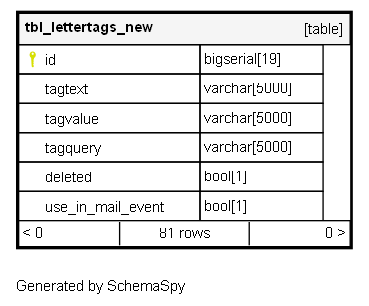
tbl_lettertags_new

81 rows


Description

Module: HRMS Document Module
Purpose: Central repository for dynamic data placeholders used in document templates and automated communications.
Data: Each row defines a reusable tag that can be embedded in templates to dynamically fetch and display employee-specific data during document generation.
Process Usage:
- Powers the template engine by replacing tags with real-time data from HR database.
- Enables creation of personalized documents without hard-coded values.
- Supports complex data retrieval through SQL queries and calculations.
Key Points:
- Tag-based substitution system for dynamic content generation.
- Supports both simple field references and complex calculated values.
- Integrated with email event system for automated communications.
Business Impact: Eliminates manual data entry in document generation, ensures data accuracy, and enables highly personalized employee communications.

Columns

Column Type Size Nulls Auto Default Children Parents Comments
id bigserial 19 nextval('tbl_lettertags_new_id_seq'::regclass)

Primary key
Format: BigSerial (auto-increment)
Used as: Unique identifier for each tag definition.

tagtext varchar 5000 ''''''::character varying

Format: String (5000 chars)
Purpose: Human-readable display name or description of the tag.
Examples: “Total Deduction”, “Professional Tax”, “Employee Weight”
UI Usage: Displayed in tag selection interfaces and template editors for easy identification.

tagvalue varchar 5000 ''''''::character varying

Format: String (5000 chars)
Purpose: The placeholder syntax used in templates for substitution.
Syntax: {{TagName}}
Examples: {{TotalDeduction}}, {{PT}}, {{EWeight}}
Usage: Embedded in HTML/DOCX templates; replaced with actual data during generation.

tagquery varchar 5000 ''''''::character varying

Format: SQL Query String (5000 chars)
Purpose: Database query or calculation logic to fetch the tag’s value.
Features:
- Supports parameterized queries using {{EmployeeID}}
- Can include complex calculations and business logic
- May call stored functions and apply conditional logic
Examples: Complex salary calculations, eligibility checks, formatted data retrieval.

deleted bool 1 false

Flag Type: Boolean (default: false)
True: Tag is soft-deleted and unavailable for use
False: Tag is active and can be used in templates
Data Retention: Preserves historical tag definitions for audit and reference.

use_in_mail_event bool 1 null

Flag Type: Boolean
True: This tag can be used in email templates and automated mail events
False: Tag is restricted to document generation only
Business Logic: Controls tag availability across different communication channels.

Indexes

Constraint Name Type Sort Column(s)
tbl_lettertags_new_pk_tbl_lettertags_new Primary key Asc id

Relationships