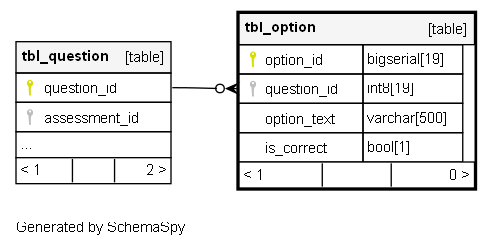
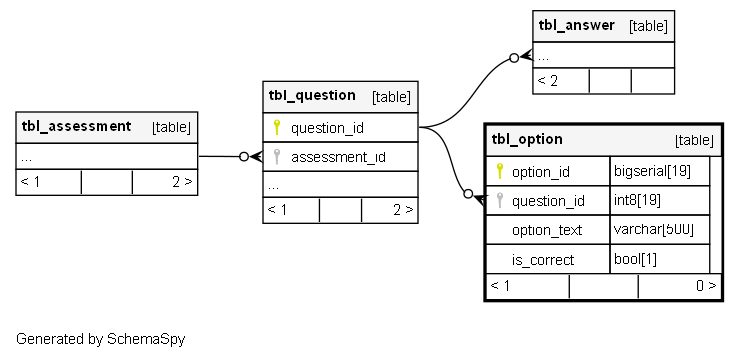
tbl_option

-1 rows


Description

Module: Learning Management
Purpose: Used to store Learning Management Assessment Answers details.
Data: One row is created for each assessment question option.
Process Usage:
- Stores options linked to specific questions.
- Marks whether an option is correct or incorrect.
- Enables accurate score calculation after an assessment is submitted.
Key Points:
- Each option belongs to a specific question.
- Indicates whether the option is correct or not.
- Supports automated result evaluation and analytics.
Business Impact: Ensures assessment accuracy and transparency in user scoring.

Columns

Column Type Size Nulls Auto Default Children Parents Comments
option_id bigserial 19 nextval('tbl_option_option_id_seq'::regclass)

Primary key
Format: BIGSERIAL (auto-increment)
Used as: Unique identifier for each option record.

question_id int8 19 null
tbl_question.question_id tbl_option_question_id_fkey C

FK: public.tbl_question.question_id
Meaning: References the question to which this option belongs.
Usage: Used to link options to specific questions within an assessment.
Purpose: Helps identify all options associated with a question for evaluation.

option_text varchar 500 null

The textual content of the option.
Format: VARCHAR(500)
Meaning: The actual answer choice entered by the user or creator.
Usage: Displayed to the learner as one of the possible answers.

is_correct bool 1 false

Indicates if the option is correct.
Format: BOOLEAN (default: false)
Usage: Determines correctness during answer evaluation.
Logic: When the assessment is submitted, the system compares user answers to correct options to calculate score.

Indexes

Constraint Name Type Sort Column(s)
tbl_option_pkey Primary key Asc option_id

Relationships